




A stream can be online, fast at the origin, and still frustrate viewers. One user gets repeated stalls on mobile data while another watches a soft 540p picture over fiber. Adaptive bitrate streaming is the control system that prevents both outcomes—provided the renditions, player, and delivery path are designed as one system.
This guide explains the complete path from source encode to player decision. It also shows where ABR deployments fail, what to measure, and how to tune quality without turning every bandwidth fluctuation into a visible switch.
We build ZeroBuffer, which produces the rendition ladder and delivers it from the same stack, so the "designed as one system" point below is not a neutral observation on our part — it is the entire product thesis. The failure modes are real regardless of who serves your segments.
What is adaptive bitrate streaming?
Adaptive bitrate streaming (ABR) is a method of delivering video in which the player chooses among multiple synchronized versions of the same content. It changes rendition as network throughput, playback buffer, device capability, and viewing conditions change, aiming for the highest sustainable quality without a stall.
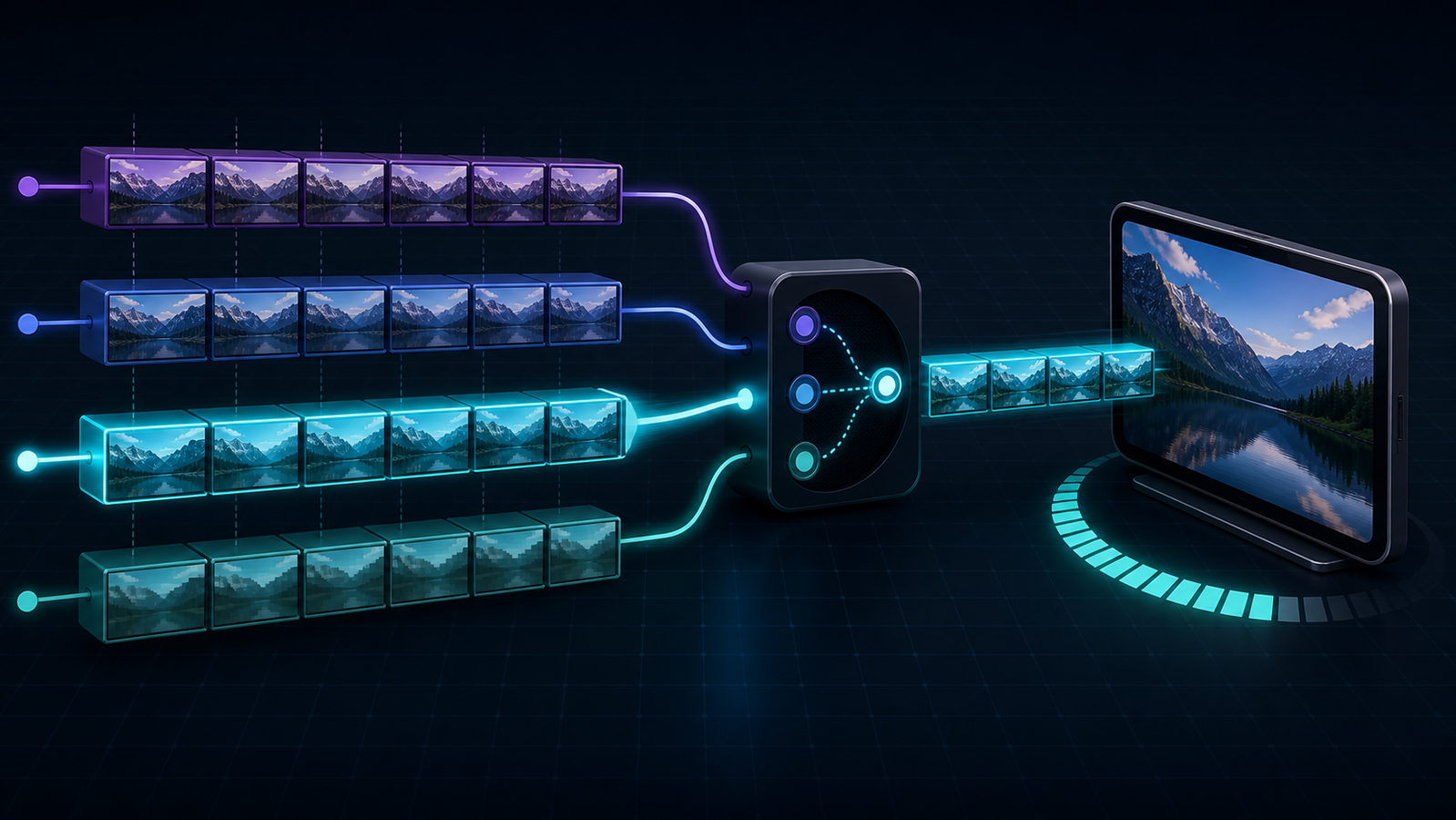
The important word is player. The server does not continuously push a custom file to each viewer. An encoder creates a ladder of renditions, a packager divides them into addressable segments, and a manifest describes what is available. The player then requests one segment at a time over HTTP and can select a different rendition at a safe segment boundary.
That basic pattern is standardized in both HLS and MPEG-DASH. The HLS specification in RFC 8216 describes playlists and media segments, while the DASH Industry Forum interoperability guidelines define practical constraints for interoperable DASH presentations.
How adaptive bitrate streaming works end to end
ABR is often explained as “the video quality goes down when the connection slows.” That describes the visible result, not the system. Five coordinated stages make the switch possible.
1. Encode a bitrate ladder
The source is encoded into several renditions. Each rung combines a resolution, bitrate, codec profile, frame rate, and audio configuration. A simple 1080p source might produce 360p, 540p, 720p, and 1080p variants, but those values are starting hypotheses—not universal rules.
Every rendition must represent the same timeline. Keyframes should align so a player can move from one rung to another without decoding from an unrelated point or creating an audio-video discontinuity.
2. Segment and package the renditions
The packager divides each rendition into short media segments and creates an HLS master playlist or DASH Media Presentation Description (MPD). The manifest identifies the available variants and gives the player the URLs and metadata required to request them.
Segment duration creates a trade-off. Shorter segments give the player more frequent decision points and can help latency, but they increase request volume and packaging overhead. Longer segments reduce that overhead but make each wrong bitrate choice more expensive because the player must download a larger unit before it can switch.
3. Deliver manifests and segments over HTTP
The origin or packager serves the manifest and media objects through a CDN. HLS was explicitly designed to work with large-scale HTTP caching infrastructure, according to RFC 8216. That lets thousands of viewers reuse popular segments at the edge instead of sending identical requests to the origin.
4. Let the player estimate safe quality
The player measures recent segment-download throughput and tracks how many seconds of video remain in its buffer. It may also consider screen size, decoder limits, dropped frames, data-saving preferences, and whether the stream is live or on demand.
The open-source dash.js ABR documentation demonstrates this model in practice: its rules can use throughput, buffer level, device resolution, dropped frames, and insufficient-buffer safeguards. The output is a choice for the next segment, not a permanent quality setting.
5. Switch at an aligned boundary
If estimated capacity falls, the player requests a lower-bitrate segment before the buffer empties. When conditions improve and the buffer is healthy, it can climb the ladder. Good logic is conservative on the way up and fast on the way down; otherwise one optimistic sample can trigger a high rendition that immediately stalls.
Adaptive bitrate streaming vs. progressive and multi-bitrate video
These delivery models are related but not interchangeable.
| Delivery model | Files available | Who selects quality? | Can quality change automatically? | Best fit |
|---|---|---|---|---|
| Progressive download | One | Publisher or fixed URL | No | Short, noncritical clips on predictable connections |
| Multi-bitrate streaming | Several | Viewer or application | Not necessarily | Manual quality selection or constrained devices |
| Adaptive bitrate streaming | Several synchronized renditions | Player ABR logic | Yes, at segment boundaries | Live and on-demand playback across variable networks |
A quality menu does not prove that ABR is working. A player can expose several renditions while remaining locked to the viewer’s choice. Conversely, a production player often provides both an automatic mode and a manual cap so viewers can trade quality for data use without disabling the ladder entirely.
HLS and MPEG-DASH both support adaptive bitrate streaming
HLS and MPEG-DASH solve the same high-level ABR problem with different manifest formats and ecosystems.
| Question | HLS | MPEG-DASH |
|---|---|---|
| Manifest | Master/media playlists, commonly .m3u8 |
MPD, commonly .mpd |
| Specification | IETF HLS specification plus Apple authoring guidance | ISO/IEC MPEG-DASH plus DASH-IF guidance |
| Typical reach | Strong native support across Apple platforms; broad reach through players | Broad standards-based reach through DASH-capable players |
| Media packaging | MPEG-TS or fragmented MP4/CMAF | Commonly fragmented MP4/CMAF |
| ABR decision | Made by the player | Made by the player |
Protocol choice does not rescue a weak ladder. In either system, the renditions need compatible codecs, aligned switching points, valid manifests, and an actual player implementation. Apple’s current HLS authoring specification is the right compatibility baseline for Apple-targeted HLS; our separate MPEG-DASH guide covers MPDs, adaptation sets, and browser playback in detail.
How to design an adaptive bitrate streaming ladder
The best ladder is not the one with the most rungs. It is the smallest set that covers your audience’s real network and device range without large quality gaps.
Start with the audience and source
Measure the devices, display sizes, countries, connection types, and codecs your audience actually uses. Then analyze the source. A static lecture, animation, grainy film, and fast-moving sport do not need the same bits to reach the same perceived quality.
This is why per-title or content-aware encoding matters. Netflix’s original per-title encode optimization showed how one fixed recipe can waste bits on simple content yet starve complex scenes. Its method selects resolution-bitrate points near the content’s quality-efficiency boundary rather than assuming every title deserves the same ladder.
Make the bottom rung genuinely playable
Your lowest rendition defines who can start and recover. It should be small enough for the slow connections you choose to support, while remaining intelligible on a small screen. Test it with constrained throughput and packet variation; do not approve it from a still frame on office Wi-Fi.
The top rung should also earn its cost. If added bitrate produces no visible improvement for the target device, it increases encoding, storage, and delivery spend without improving experience.
Space rungs by meaningful quality gains
Renditions that are too close add files and cache objects but give the player little useful room to maneuver. Rungs that are too far apart force a harsh choice between blurry playback and a risky download. Use objective quality measurements as a filter, then confirm representative content with human viewing tests.
Keep frame rates, audio timelines, segment boundaries, and keyframes compatible across the switching set. A visually sensible ladder can still fail if a player cannot switch cleanly between its rungs.
How the player chooses a bitrate
ABR algorithms generally fall into three families.
- Throughput-based logic estimates capacity from recent segment downloads and chooses a rendition below a safe fraction of that estimate. It reacts directly to network change but can chase noisy samples.
- Buffer-based logic maps buffer occupancy to quality. A full buffer permits a higher rung; a shrinking buffer forces caution. It is stable when the buffer is established but has less information during startup.
- Hybrid logic combines throughput and buffer state, often adding switch history, dropped frames, device limits, and request-abandon rules.
dash.js, for example, can dynamically use throughput and BOLA buffer-based rules depending on buffer level, as its current ABR settings documentation explains. That is a useful reminder that “the ABR algorithm” is rarely one formula running unchanged from first frame to last.
Tune the startup policy separately from steady-state playback. Starting at the top rung can create a slow first frame; always starting at the bottom can make every session look unnecessarily soft. A sensible initial estimate, followed by cautious ramp-up, usually gives a better balance.
For live video, the buffer budget is smaller, so each estimate carries more risk. Low latency and maximum resilience pull in opposite directions. If the event workflow is your main concern, use the CDN live streaming guide to budget ingest, packaging, delivery, and player delay together.
Configure the CDN and origin for ABR traffic
ABR multiplies objects and requests. Four renditions with short segments do not behave like one large MP4, and a live manifest should not use the same caching policy as an immutable video segment.
- Cache versioned VOD segments for a long time; avoid query parameters or headers that fragment the cache key without purpose.
- Give live manifests short, deliberate freshness rules so viewers see new segments without forcing every request to the origin.
- Use origin shielding or request collapsing to prevent a popular newly published segment from producing a burst of duplicate origin fetches.
- Preserve byte-range behavior, content types, CORS headers, and compression rules expected by the player.
- Test cache-hit ratio by object class: manifests, audio, video, subtitles, and keys have different lifecycles.
ZeroBuffer builds the encoding and delivery layers as one system: automatic multi-rendition encoding to 4K, 1080p, 720p, and 480p feeding HLS streaming to every browser, phone, and TV, delivered at a flat $0.0049/GB.
For ABR specifically, that removes the most common source of misconfiguration: a ladder defined in one vendor's console and cache rules defined in another's, with segment durations and manifest TTLs that quietly disagree. One stack means the ladder and the edge configuration cannot drift apart.
Measure whether adaptive bitrate streaming is working
Average CDN latency alone cannot tell you whether viewers had a good session. Instrument the player and connect its events to delivery telemetry.
Track at least:
- Video startup time: time from play intent to first moving frame.
- Rebuffer ratio: stalled playback time divided by total play time.
- Rebuffer frequency: stalls per session, not just total stalled seconds.
- Time to desired quality: how long eligible viewers remain below a useful rendition.
- Average played bitrate or quality: segmented by device and network type.
- Quality-switch rate: frequent up/down oscillation can be distracting even without stalls.
- Playback failures and exits before start: grouped by manifest, segment, codec, DRM, and network error.
- Segment throughput and download time: the raw signals behind player choices.
- Cache-hit ratio and origin offload: separated by manifests and media segments.
Use percentiles and cohorts, not only global averages. A healthy aggregate can hide poor mobile performance in one country, one television model that drops frames at the top rung, or a live encoder whose output drifts only after long sessions.
Common ABR failures and what they usually mean
| Symptom | Likely cause | First check |
|---|---|---|
| Repeated high-low-high switching | Unsafe throughput estimate or rungs too close | Segment download samples and switch history |
| Stalls despite frequent downshifts | Bottom rung still exceeds sustainable throughput | Lowest rendition bitrate and audio overhead |
| Quality never rises | Conservative cap, weak throughput estimate, or small buffer target | Player ABR settings and measured capacity |
| Visible glitch during a switch | Misaligned keyframes, timelines, or incompatible encode settings | Segment boundaries across every rendition |
| Origin spike at a live event | Low edge reuse or simultaneous cache misses | Cache key, TTL, shield, and request collapsing |
| Good network metrics but dropped frames | Device decoder or CPU/GPU limit | Player dropped-frame and capability data |
| Old live window or segment 404s | Manifest freshness or publish timing mismatch | Manifest TTL, clock, and segment availability |
Test these conditions deliberately. Shape bandwidth up and down, introduce jitter, switch networks, background the app, seek across the asset, and run long sessions. A clean five-minute playback on a developer laptop is not an ABR qualification test.
Adaptive bitrate streaming implementation checklist
- Define target devices, codecs, connection range, latency, and accessibility requirements.
- Build a content-aware ladder with a viable bottom rung and an earned top rung.
- Align keyframes, timestamps, segment boundaries, audio, and captions across variants.
- Validate HLS playlists or DASH MPDs against the relevant specification and real players.
- Configure separate freshness policies for manifests and immutable media segments.
- Verify CORS, range requests, encryption keys, DRM, and cache-key behavior.
- Exercise startup, downshift, recovery, seeking, long playback, and live-window movement.
- Instrument player QoE events and join them to CDN and origin telemetry.
- Review results by device, geography, network type, title, and app version.
- Change one ladder, player, or delivery variable at a time and compare cohorts.
Frequently asked questions
What is adaptive bitrate streaming (ABR)?
Adaptive bitrate streaming gives a player multiple synchronized versions of a video and lets it select a rendition for each upcoming segment. The choice changes with throughput, buffer health, device capability, and playback conditions so the session can avoid stalls while using the best sustainable quality.
Does Netflix use adaptive bitrate streaming?
Yes. Netflix has publicly documented its use of bitrate ladders and per-title encoding, which adapts the available resolution-bitrate combinations to the complexity of each title. The player can then choose among those prepared encodes during playback.
What is the difference between multi-bitrate and adaptive bitrate streaming?
Multi-bitrate means several renditions exist. Adaptive bitrate means the player automatically chooses and switches among compatible renditions based on current conditions. A service can offer multiple manual quality options without running automatic ABR.
What is an adaptive bitrate streaming player?
It is a player that can read an HLS or DASH manifest, monitor playback and network signals, and select upcoming media segments from different renditions. The player contains the ABR decision logic; the CDN delivers the objects it requests.
Does adaptive bitrate streaming reduce bandwidth costs?
It can, but it is not automatic. A well-designed ladder avoids sending high-bitrate renditions to viewers who cannot use them, and content-aware encoding removes waste where extra bits do not improve quality. Poorly spaced or oversized renditions can erase that benefit.
Build for recovery, then tune for quality
Start with a ladder that can survive the worst network conditions you intend to support. Then tune ramp-up, rendition spacing, and top-end quality using real session data—not a single office connection or a copied bitrate table.
If encoding alignment, player behavior, and edge delivery are measured together, ABR becomes predictable: fast starts, fewer stalls, stable quality, and controllable egress. Use the checklist above on one representative title or test stream, establish a QoE baseline, and only then roll the configuration across the catalog.
Fewer vendors make that easier to measure. ZeroBuffer puts the ladder and the delivery in one platform at a flat $0.0049/GB with encoding included — free to start, no card — so the renditions you encode and the bytes you deliver come from the same place.