




A live event can look healthy in rehearsal and collapse the moment thousands of players request the same new segment. The encoder is still sending, the origin is still up, yet viewers see slow starts, buffering, or a feed that drifts further behind the action. A sound CDN live streaming design prevents that failure by treating ingest, packaging, caching, and playback as one system—not four unrelated services.
This guide is for video, platform, and DevOps teams planning an HLS or Low-Latency HLS workflow. It explains the delivery path, shows where glass-to-glass delay accumulates, and turns concurrency into concrete origin and CDN decisions. It stays focused on live-event engineering; for pricing and provider comparisons, use the separate CDN for video buyer's guide.
What is a CDN for live streaming?
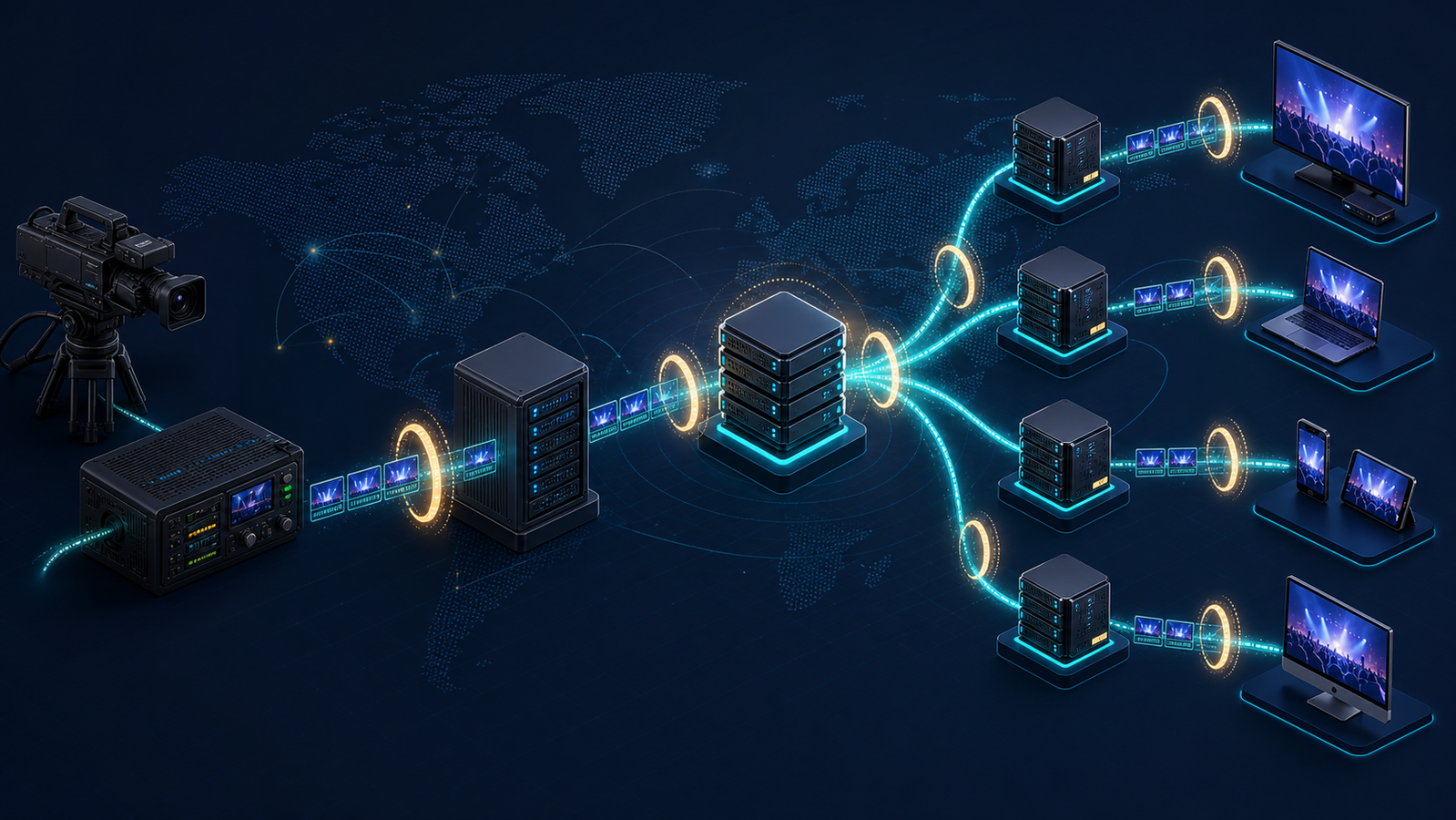
A CDN for live streaming is a distributed edge network that retrieves newly created video segments from an origin or shield and serves them close to viewers. It lets many viewers reuse the same cached segments, reducing network distance and preventing each player from opening a separate delivery path to the live origin.
Unlike video on demand, a live stream has no complete asset waiting in storage. The encoder continuously creates media, the packager updates playlists, and the CDN has only a narrow window to fetch and distribute each object before viewers need it. Cloudflare's video CDN explainer describes this key distinction: live segments are cached as they are created rather than fetched from a finished file.
That makes correctness as important as capacity. Treat the workflow as a synchronized pipeline with a latency and reliability budget at every handoff.
How a CDN live streaming pipeline works
The common path is capture → encode → ingest → transcode/package → origin or shield → CDN edge → player. Each stage solves a different problem, and the protocol used on one side of the workflow does not have to be the protocol used on the other.
1. Capture and contribution
A camera or production mixer produces the program feed. An encoder compresses it and sends a contribution stream to an ingest endpoint. RTMP is widely supported; SRT is useful when the contribution path crosses an unpredictable public network.
SRT is not a browser playback format. It is a transport for moving the contribution feed into the media workflow. The open-source SRT project documentation explains that the protocol uses configurable recovery and latency behavior to handle packet loss and jitter, which is why it is often chosen for remote venues and field production.
For a premium event, use independent contribution paths. Two encoders are not fully redundant if they share a switch, ISP, power circuit, or ingest region.
2. Transcoding and packaging
The media service converts the contribution feed into an adaptive bitrate ladder, then packages each rendition for delivery. A master playlist points to rendition playlists; those playlists point to media segments or partial segments. The HTTP Live Streaming specification defines this relationship and requires variant streams to remain aligned so a player can switch between them.
Keyframes, segment boundaries, timestamps, and discontinuity markers must align across renditions. Otherwise, quality switches can stall even when every file returns HTTP 200.
3. Origin, shield, and edge distribution
The media origin exposes playlists and segments over HTTP. Edge locations cache them near viewers, while a shield consolidates simultaneous misses for a just-published object into fewer origin requests.
This is particularly valuable for live packaging. AWS documents live just-in-time packaging as an Origin Shield use case and explains that its shield can collapse simultaneous requests for the same object. The principle is provider-independent: reduce the number of independent systems allowed to ask the packager for a brand-new segment.
4. Player requests and adaptive playback
The player selects a rendition, refreshes its media playlist, downloads segments, fills a buffer, and changes bitrate as conditions change. Apple's HLS overview explains that HLS runs over ordinary web servers and CDNs and adapts to available network speed.
The player is therefore part of the delivery system. Measure its startup time, selected bitrate, rebuffering, live-edge distance, and errors by device and network. CDN request success alone cannot tell you whether the viewer saw moving video.
Build a glass-to-glass latency budget
Glass-to-glass latency is the elapsed time from an action in front of the camera to the corresponding frame appearing on a viewer's screen. The CDN affects it, but so do capture buffering, encoder lookahead, contribution transport, transcoding, packaging, playlist availability, player buffer policy, and the last mile.
Do not start by choosing the lowest latency mode available. Start with the interaction the product requires. A one-way broadcast can spend more of the budget on playback resilience; live auctions, betting, watch parties, and audience participation may require the viewer to stay much closer to the live edge.
| Budget component | What adds delay | What to control |
|---|---|---|
| Capture and encode | Frame buffers, lookahead, keyframe interval | Encoder preset, GOP length, aligned keyframes |
| Contribution | Network RTT, jitter buffer, retransmission | Ingest proximity, SRT latency, redundant paths |
| Transcode and package | Processing queue, segment or part production | Capacity, ladder size, segment and part duration |
| CDN | Origin fetches, stale playlists, path length | Cache policy, shield placement, edge coverage |
| Player | Startup buffer, playlist reload timing, live-edge target | Player configuration and device testing |
| Last mile | Throughput variation, loss, Wi-Fi or mobile congestion | ABR ladder, conservative startup rendition |
Measure the boundaries rather than guessing. Correlate contribution receive, encode output, packager publish, shield fetch, edge response, and player presentation timestamps.
Standard HLS versus Low-Latency HLS
Standard live HLS publishes complete segments and gives the player enough buffered media to tolerate ordinary network variation. It scales cleanly through HTTP caches, but segment production and player buffering add delay.
Low-Latency HLS reduces that wait by making parts available before the full segment is complete. Apple's current Low-Latency HLS documentation is the implementation reference.
LL-HLS is not a switch on the player alone. The encoder and packager must produce aligned parts, the origin must publish playlists correctly, the CDN must support the request behavior used by low-latency delivery, and the player must hold an appropriate live-edge target. If one layer silently falls back to ordinary behavior, the stream may play successfully while missing its latency goal.
Stability is part of the latency target
A tiny player buffer can win a lab test and fail a real event. Target the lowest sustained latency that meets rebuffering and playback-success objectives across the actual device and network mix.
Track the distribution, not just the median. A stream with acceptable median latency but a long tail can leave a meaningful group of viewers far behind the action. Compare p50, p95, and p99 live-edge distance alongside rebuffer ratio and fatal playback errors.
CDN live streaming setup: a production-ready sequence
The safest setup order follows the media path. Prove each boundary before adding the next, then load-test the assembled system with production-like manifests and geographic demand.
1. Write measurable service objectives
Define the maximum acceptable glass-to-glass latency, playback-start target, playback-success rate, rebuffer ratio, and recovery time after an ingest or origin failure. Segment the goals by major geography and device class; a global average can hide one failing market.
Define peak concurrency and the arrival curve. Ten thousand viewers arriving over an hour differs from ten thousand pressing play in one minute.
2. Make ingest redundant
Choose ingest close to production, not the audience. Test switching between independent feeds, preserving timestamps and stream identity so the packager can signal a clean discontinuity.
3. Build an aligned ABR ladder
Build renditions for the connections and screens viewers use. Space bitrates meaningfully, align keyframes and segment boundaries, and leave throughput headroom.
Each extra rendition adds encoding, objects, and monitoring. Validate upward and downward switches under throttled bandwidth.
4. Package for the latency mode
Use HLS when scale and resilience matter more than near-real-time interaction; choose LL-HLS when the product requires a tighter live edge and the complete chain supports it. Keep playlist updates atomic. RFC 8216 warns that non-atomic playlist changes can cause playback errors, and it requires a live playlist to retain enough duration to avoid stalls as older segments roll off.
Test discontinuities, ad breaks, encoder restarts, caption changes, and rendition loss—not only a clean rehearsal.
5. Separate playlist and segment cache policies
Live playlists are small, mutable control objects. They need short, protocol-aware freshness and revalidation behavior so players discover new media promptly. Segments and initialization files are immutable once published, so give them stable URLs and cache them much longer.
Keep per-viewer IDs, analytics parameters, and raw authorization tokens out of segment cache keys. Authorized viewers requesting identical bytes should reuse the object after access validation. Normalize cache keys and verify them in logs.
6. Put a shield in front of the packager
Choose a shield close to the packager. Verify request coalescing under load and confirm in origin logs that one new segment does not cause one fetch per edge.
A note on where we stand: ZeroBuffer encodes, stores, and streams video on demand as one platform, but it doesn't offer live streaming yet, so treat this checklist as vendor-neutral.
Live is where consolidation pays off hardest. When encoding, packaging, delivery, and analytics come from four vendors, a rebuffering spike during an event turns into four dashboards and a conference call. When they come from one stack, latency boundaries and origin load are visible in a single view — and a traffic spike costs proportionally more instead of triggering an overage tier.
7. Secure access without destroying cache reuse
Authenticate at the edge without making media unique per viewer. Rotate keys, enforce TLS, and test expired, malformed, replayed, and geographically disallowed requests.
If the stream uses encryption or DRM, load-test the license or key service independently. A CDN can deliver every segment successfully while viewers fail at the smaller, dynamic authorization dependency.
8. Validate the real player matrix
Test the production manifest on priority browsers, operating systems, TVs, and app versions. Include bandwidth drops, network changes, long sessions, captions, ad markers, and recovery after falling behind the live window. The HLS player selection guide provides a broader framework.
Plan capacity for event concurrency
Viewer concurrency drives edge traffic; object creation rate drives origin pressure. Keeping those two models separate prevents expensive overbuilding in one layer and dangerous underbuilding in another.
Estimate delivered throughput as:
concurrent viewers × average delivered bitrate × safety factor
For 25,000 viewers averaging 4 Mbps, the edge fleet delivers about 100 Gbps before protocol overhead and safety margin. Also model a high-quality scenario in which many home viewers select upper renditions.
Origin requests should not scale linearly with viewers when caching works. They scale with the number of new media objects, cache variants, shield paths, and misses. During a test, compare these counters:
- Unique segment and playlist URLs published per minute
- Edge cache-hit ratio split by manifests, parts, segments, and init files
- Shield hit ratio and request-coalescing behavior
- Origin requests and outbound throughput per rendition
- Player starts, concurrent sessions, and average selected bitrate
If origin requests rise in step with viewers, stop and inspect cache-key fragmentation, cache bypass headers, token handling, and TTLs. Adding packager instances may mask the problem for one event while preserving a cost and reliability fault.
Model the arrival spike, not only steady state
Load tests should reproduce the countdown moment when many cold players request the master playlist, several rendition playlists, init segments, keys, and the newest media at once. Warm-cache throughput tests miss this burst.
Test a cold start, a warm event, primary-ingest loss, and origin loss or slowdown. Confirm player retries do not stampede the origin.
Performance metrics that expose the real bottleneck
Infrastructure and player telemetry answer different questions. Join them with a shared event ID, stream ID, rendition, region, autonomous system, and time window.
| Metric | What it reveals | Where to investigate first |
|---|---|---|
| Video startup time | Delay before first frame | Manifest path, init segment, player buffer |
| Rebuffer ratio | Playback time spent stalled | Last-mile throughput, ladder, segment delivery |
| Live-edge distance | End-to-end latency and drift | Packager availability, player target, stale playlists |
| Playback failure rate | Sessions that never sustain video | Manifest validity, CORS, auth, codec support |
| Segment TTFB p95/p99 | Edge or upstream delay | Regional routing, cache misses, shield-to-origin path |
| Edge and shield hit ratio | Object reuse and origin protection | Cache key, TTL, bypass headers |
| Origin request rate | Packager exposure | Coalescing, variant count, cache fragmentation |
| Rendition switches | ABR stability | Ladder spacing, throughput estimation, encoding |
Alert on ratios and tails, not request volume alone. Watch error rate, miss rate, tail latency, and viewer outcomes relative to concurrency.
During the event, display contribution health, the latest published sequence, CDN and cache status, origin load, and player quality by region. Give every alert an owner and rollback action.
Common failure modes and practical fixes
The playlist is cached longer than the media cadence
Symptom: players start but remain behind the live edge or repeatedly request an old sequence. Fix: use protocol-aware short freshness for live playlists, verify revalidation at the edge, and compare the latest sequence at packager, shield, and edge.
Every session creates a different segment cache key
Symptom: edge bandwidth rises normally while cache-hit ratio stays low and origin requests follow viewer count. Fix: validate authorization separately, strip irrelevant session parameters from the object cache key, and keep only parameters that change the returned bytes.
Renditions are not aligned
Symptom: playback is stable at one quality but stalls or jumps during ABR switches. Fix: align keyframes, segment boundaries, timestamps, and discontinuities across the ladder; validate all playlists as one presentation.
LL-HLS works in one client but not across the fleet
Symptom: some players achieve the target while others fall back, drift, or fail. Fix: test support at every layer and device, maintain a standard-HLS fallback where required, and record the negotiated playback mode in analytics.
The backup path is present but unproven
Symptom: failover takes longer than expected or publishes a broken timeline. Fix: carry representative traffic or scheduled tests over the backup, rehearse the switch under load, and verify shared dependencies such as DNS, credentials, power, and origin.
A cold edge surge overwhelms the shield or origin
Symptom: the event fails at opening even though steady-state load tests passed. Fix: test the synchronized start, enable request coalescing, pre-position only the static objects that can be warmed, and scale the shield and packager for unique-object production rather than total delivery bandwidth.
Pre-event readiness checklist
- Confirm primary and backup contribution paths from the actual venue.
- Validate every rendition, caption track, ad marker, and discontinuity case.
- Check live playlist freshness and long-lived immutable segment caching.
- Prove cache-key reuse across two authenticated viewer sessions.
- Compare edge, shield, and origin request counts during a cold-start load test.
- Rehearse ingest, packager, origin, and CDN failure separately.
- Verify player behavior on the real device and network matrix.
- Set dashboards and alerts for latency, startup, rebuffering, failures, and cache misses.
- Pre-assign incident roles, rollback conditions, and communication channels.
- Keep enough origin and authorization capacity for retries during recovery.
Frequently asked questions
Is a CDN used in live streaming?
Yes. A CDN distributes newly created live-video segments through edge servers so viewers can fetch them near their network location instead of all connecting to one origin. This improves scale and protects the origin, while the encoder, packager, cache policy, and player still determine the final latency and playback quality.
Does a CDN reduce live-stream latency?
A CDN can reduce delivery distance and avoid repeated origin round trips by serving segments from nearby edges. It cannot remove latency already added by capture, encoding, contribution, packaging, or the player's buffer, so teams must optimize and measure the full glass-to-glass path.
Which CDN is best for live streaming?
The best fit is the CDN that meets your latency, geographic, concurrency, cache-control, security, observability, support, and cost requirements in a production-like test. Compare player outcomes and origin protection in your priority networks rather than choosing by point-of-presence count alone.
How do you load-test a live streaming CDN?
Publish a valid multi-rendition stream and simulate the actual viewer arrival curve, playlist refresh cadence, bitrate mix, session duration, and geography. Test cold and warm caches plus ingest and origin failures, then evaluate player startup, rebuffering, live-edge distance, CDN tail latency, cache hits, and origin request rate together.
Test one real event before you commit
A reliable CDN livestream is built by controlling the handoffs. Set a latency and playback objective, make contribution redundant, align the ABR ladder, package for the chosen latency mode, separate playlist and segment caching, shield the origin, preserve cache reuse through authentication, and validate the real players.
Before choosing or changing infrastructure, run one production-like event test with the full arrival spike and failure drills. Keep the candidate that meets viewer-facing targets while origin requests remain tied to new objects — not to the number of people watching.
If your catalogue also includes video on demand, ZeroBuffer encodes, stores, and streams it as one platform at a flat $0.0049/GB that does not spike when your audience does. Free to start, no card, no contract.