



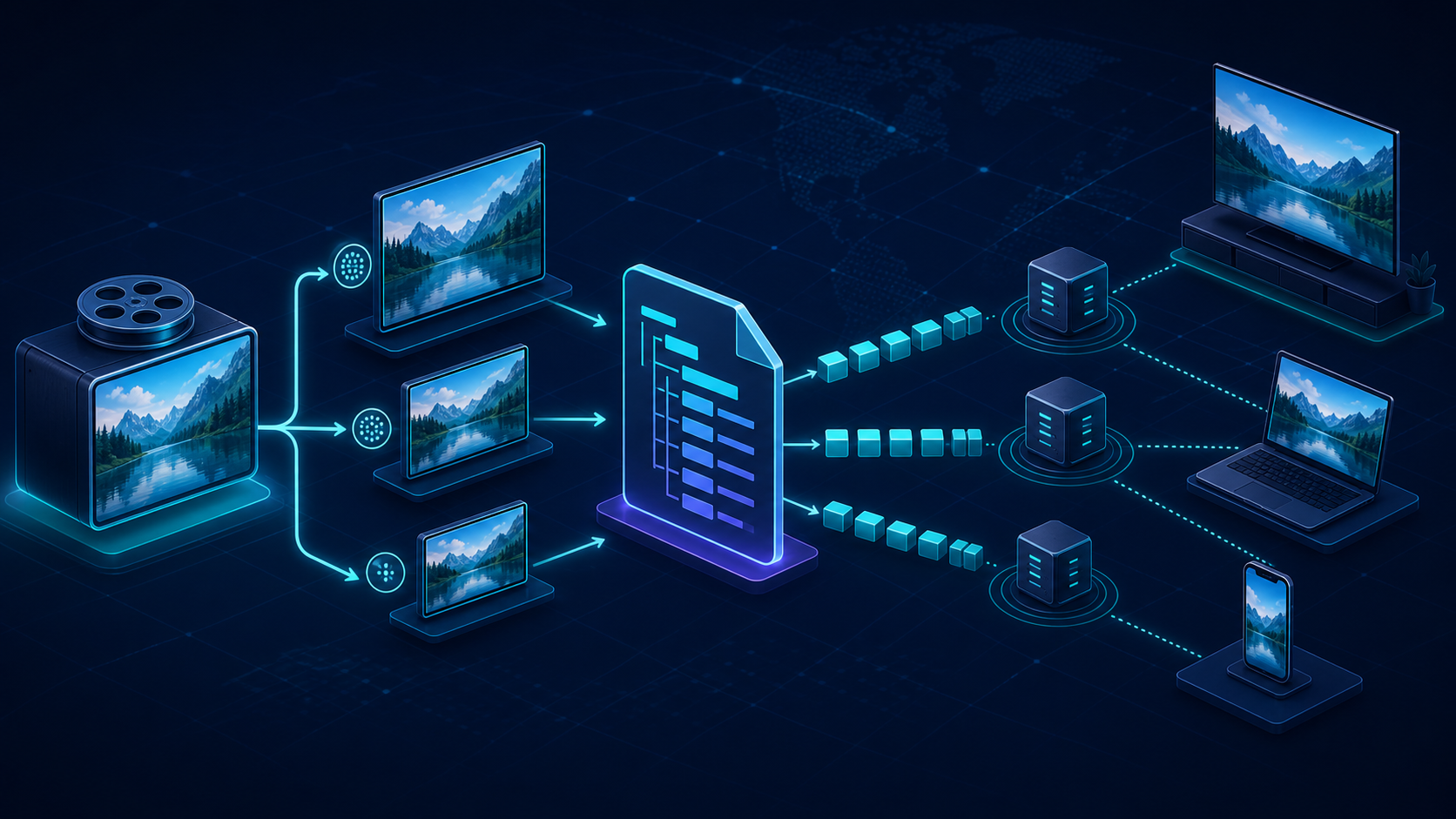
A stream can return every request with HTTP 200 and still fail in the player. One rendition has different keyframe boundaries, the manifest points at an expired segment, or the browser can download the media but cannot append its codec. Understanding MPEG-DASH as a complete control-and-media system makes those failures much easier to prevent.
This guide follows a DASH stream from encoding through playback. It explains the MPD, segments, representations, CMAF, browser support, caching, and the practical differences between DASH and HLS—without turning the protocol into a provider comparison. For live-event latency and capacity planning, use the separate CDN live streaming guide.
What is MPEG-DASH?
MPEG-DASH is an international standard for adaptive streaming over ordinary HTTP. It describes available media in an XML Media Presentation Description (MPD), while a client selects and requests short media segments at a quality suited to its bandwidth, buffer, device, and playback conditions.
DASH stands for Dynamic Adaptive Streaming over HTTP. It is standardized as ISO/IEC 23009. The base specification is Part 1, published as ISO/IEC 23009-1:2022 and updated by the sixth edition; it defines the MPD and segment formats. The broader MPEG-DASH standards suite also covers conformance software, implementation guidance, encryption, network assistance, CMAF delivery, and other functions.
The important distinction is that DASH is not a codec. It can describe media encoded with different codecs and stored in supported segment formats. It is also not the algorithm that decides when to change quality: the player owns that adaptive bitrate, or ABR, decision.
How MPEG-DASH works from encoding to playback
A DASH video is not one file sent from start to finish. It is a set of synchronized alternatives plus a manifest that tells the player how those alternatives fit together.
1. Encode an adaptive bitrate ladder
The encoder creates multiple renditions of the same program. A typical ladder might include 360p, 720p, and 1080p video at different bitrates, plus one or more audio tracks and subtitle tracks.
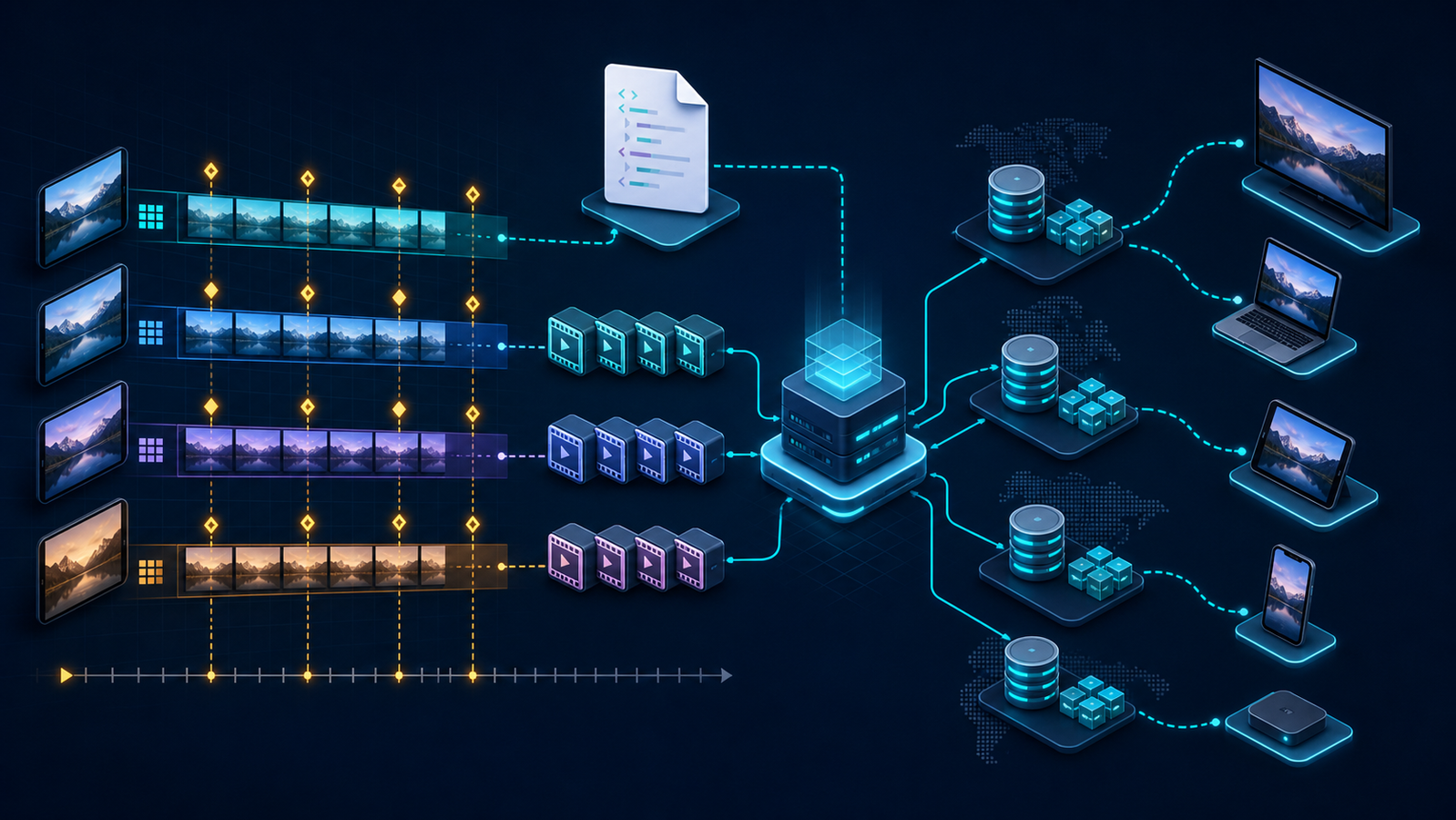
Every switchable video rendition must describe the same timeline. Keyframes and segment boundaries need to align so the player can finish one segment at one quality and begin the next at another quality without a gap, overlapping frames, or a decoder reset.
2. Package each rendition into addressable segments
The packager divides each rendition into short media objects and produces any required initialization data. Segment duration is a design choice, not a universal DASH constant. Shorter segments can give the player more frequent switching opportunities, but they increase request volume and packaging, manifest, and cache overhead.
These media objects are commonly fragmented MP4 files or byte ranges. DASH can support other media formats; the standard deliberately separates the delivery description from a single mandatory codec or container choice.
3. Publish the MPD
The packager writes an .mpd file that describes the presentation. It tells the client which renditions exist, their codecs and bandwidths, how time is represented, and how to construct or locate initialization and media segment URLs.
For on-demand video, the MPD is normally static. For a live service, it is dynamic and changes as new media becomes available and old media leaves the playback window. CableLabs' MPEG-DASH overview explains this static-versus-dynamic distinction and the MPD hierarchy in detail.
4. Let the player choose, fetch, and switch
The player retrieves the MPD, filters out media it cannot decode, and chooses a starting representation. It then requests initialization data and media segments over HTTP.
During playback, the ABR logic observes signals such as measured throughput, buffer occupancy, recent request time, viewport, and device capability. It chooses the representation for a future segment. DASH enables this choice; it does not require every player to make the same decision.
5. Reuse ordinary HTTP delivery infrastructure
Because manifests and segments are HTTP resources, they can pass through web servers, reverse proxies, and CDNs. The MPD is a small control object; media segments carry nearly all the bytes. They should not receive identical cache treatment.
Immutable segments benefit from stable URLs and long cache lifetimes. A dynamic MPD needs a short, deliberate freshness policy so a live player can discover newly published media. This difference is central to a reliable DASH video protocol workflow.
What is inside an MPEG-DASH MPD?
The MPD is a hierarchy, not just a flat playlist. Reading that hierarchy from the outside in makes most manifests easier to debug.
| MPD element | What it represents | Typical use |
|---|---|---|
MPD |
The entire presentation | Declares static or dynamic behavior and overall timing |
Period |
A bounded interval on the presentation timeline | Main program, ad break, chapter, or a changed set of tracks |
AdaptationSet |
A group of interchangeable or selectable media components | Video, audio language, captions, or alternate viewpoint |
Representation |
One encoded option inside an adaptation set | A specific bitrate, resolution, and codec combination |
SegmentTemplate, SegmentList, or SegmentBase |
Instructions for locating media | Constructed URLs, explicit URL lists, or byte-range indexing |
A simple presentation might have one period, a video adaptation set with four representations, an English audio adaptation set, a Hindi audio adaptation set, and a captions adaptation set. The player does not switch a video representation into an audio adaptation set; it selects compatible components and switches among appropriate representations within them.
Segment addressing changes manifest size and behavior
SegmentList can enumerate each media object explicitly. That is straightforward, but a long presentation with many renditions can produce a large MPD.
SegmentTemplate uses a pattern containing values such as a representation ID, segment number, or timestamp. A compact template can describe thousands of segments without listing every URL. SegmentTimeline adds explicit timing where a fixed duration is not sufficient, including variable-duration media or discontinuous timelines.
SegmentBase can describe media held in a single resource and located with byte ranges. A client and HTTP delivery path must then handle range requests correctly.
Live MPDs are moving windows
A dynamic MPD includes timing information that helps the player relate wall-clock time, presentation time, and segment availability. The player refreshes the MPD, advances through the available window, and tries to maintain a target distance from the live edge.
Clock error can therefore become a playback error. If the packager, player, or availability calculation disagrees about time, the client may request a segment before it exists or after it has been removed. Inspect the MPD timing fields and response timestamps before blaming raw bandwidth.
MPEG-DASH segments, codecs, and containers are different layers
Teams often say “DASH format” when they mean one of several different things. Separating the layers prevents compatibility assumptions.
| Layer | Its job | Examples |
|---|---|---|
| Delivery protocol | Describes adaptive choices and how to request them | MPEG-DASH |
| Manifest | Describes presentation structure and segment addressing | XML .mpd |
| Codec | Compresses and decodes audio or video samples | AVC/H.264, HEVC, AV1, AAC |
| Container/segment format | Organizes encoded samples, timing, and metadata | Fragmented MP4, WebM |
| Encryption/DRM signaling | Protects samples and identifies license systems | Common Encryption with player-supported DRM |
| Player API | Feeds supported media into browser playback | Media Source Extensions (MSE) |
“Codec-agnostic” does not mean every codec works on every device. It means the DASH description is not locked to one codec. The player still needs a decoder, the container and codec combination must be supported, and protected media needs a compatible DRM path.
On the web, a JavaScript DASH player usually parses the MPD and appends media through MSE. The W3C Media Source Extensions specification defines the browser API that lets JavaScript build a playable media stream, while dash.js is the DASH Industry Forum's reference client for browsers with MSE support.
How MPEG-DASH and CMAF fit together
CMAF is a media application format, not a replacement for DASH. It constrains fragmented MP4 media so compatible streaming systems can use a common set of encoded media objects while retaining different manifests and playback logic.
That matters when a service delivers DASH and HLS. Without a common media format, a team may package and store separate segment sets for each protocol. With compatible codecs, encryption, timing, and CMAF packaging, both delivery paths can often reference the same underlying media segments while DASH uses an MPD and HLS uses M3U8 playlists.
The DASH-IF interoperability guidelines constrain version 5 delivery to CMAF-formatted media and publish separate guidance for on-demand, live, low-latency, ad insertion, protection, video, audio, text, events, and conformance. That narrower interoperability target is useful because the base DASH standard intentionally allows many valid options.
CMAF alone does not guarantee one encode for every device. Codec support, DRM systems, captions, and player behavior can still force additional outputs. Treat shared segments as a result to validate against a device matrix, not an automatic property of adding an .mpd file.
DASH vs HLS: what actually differs?
DASH and HLS solve the same broad problem: both describe segmented HTTP media and let a player move among encoded alternatives. An MPEG-DASH vs HLS decision is usually about playback reach, ecosystem requirements, manifest tooling, and whether one CMAF media set can serve both.
| Decision area | MPEG-DASH | HLS |
|---|---|---|
| Specification | International ISO/IEC standard | Apple-authored protocol published as an open specification and informational RFC |
| Manifest | XML MPD | Text-based M3U8 master and media playlists |
| Codec policy | Protocol is codec-agnostic | Compatibility is governed by HLS and Apple playback requirements |
| Web playback | Commonly uses a JavaScript player through MSE | Safari provides native HLS; other browsers often use player libraries and MSE |
| Apple delivery | Not the default native streaming path | Native path across Apple's ecosystem |
| Shared media | Can use CMAF fragmented MP4 | Can use CMAF fragmented MP4 |
The HLS protocol specification defines master playlists, media playlists, segments, and client reload behavior. Its playlist model differs from an MPD, even when the bytes referenced by both protocols are compatible CMAF video segments.
For a browser-only product with controlled devices, DASH can provide an open, flexible delivery path through a mature player. For broad consumer reach, many services publish both DASH and HLS; the HLS player guide covers client selection in more detail.
Whether you frame the question as DASH vs HLS or HLS vs DASH, the same five inputs decide it: the devices you must reach, your DRM systems, captions, the ad workflow, and the latency mode you are targeting. Do not choose from the manifest extension alone—and for most consumer services the honest answer is both, with CMAF keeping one media set behind two manifests.
How to deploy MPEG-DASH without playback surprises
The most useful implementation sequence validates each boundary before a CDN or player hides the original fault.
1. Prove the encode and timeline
Check that every switchable rendition starts from the same source timeline. Align keyframes and segment boundaries, keep audio and video timestamps coherent, and exercise transitions across periods, ad markers, and encoder restarts.
Test upward and downward switches under controlled bandwidth changes. A stream that plays at one fixed representation has not yet proved ABR correctness.
2. Validate the MPD and every referenced object
Use a DASH conformance validator and inspect the MPD as XML. Confirm that URLs resolve as intended from the manifest location, templates generate real object names, initialization segments exist, declared codecs match the media, and live timing fields agree with actual availability.
Run the same checks after your packaging configuration changes. Valid XML is not necessarily a valid, interoperable presentation.
3. Serve the right HTTP behavior
Return the MPD as application/dash+xml. Configure cross-origin response headers for the player origin, preserve byte-range requests where the packaging requires them, and make content lengths and cache validators consistent.
The MDN DASH deployment guide calls out byte-range support, the DASH MIME type, and a JavaScript player such as dash.js as practical web-server requirements. Test these headers from an actual browser origin rather than only with a same-origin command-line request.
4. Give manifests and segments different cache rules
Cache immutable initialization and media segments with stable, versioned URLs. Keep query parameters that do not alter the bytes—session IDs, analytics tokens, or arbitrary cache busters—out of the segment cache key after authorization is handled safely.
Apply shorter, protocol-aware freshness to a dynamic MPD. Then compare the latest manifest at the packager, shield, edge, and client when a player falls behind.
A note on where we stand: ZeroBuffer streams HLS today, not DASH, with configurable media cache policies and included multi-rendition encoding at a flat $0.0049/GB.
The practical value for a DASH workflow is joined evidence. When manifest and segment caching, origin fetch behavior, and viewer-side playback telemetry can be read together, a stalled stream points to the MPD, the segment cache, or the player — instead of three vendors' logs correlated by timestamp.
5. Select a player from the device matrix
Do not assume a browser plays an MPD merely because it supports <video>. DASH web players commonly use MSE, and the exact codec, container, and DRM combination still matters.
Test current browsers, mobile platforms, smart TVs, set-top boxes, and app runtimes that contribute meaningful traffic. Include encrypted and clear content, captions, multiple audio tracks, seeking, long sessions, network changes, and recovery after a removed live segment.
6. Observe viewer outcomes and delivery causes together
Collect startup time, rebuffer ratio, fatal playback errors, average selected bitrate, quality switches, buffer level, live-edge distance, and DRM failures. Join those outcomes to MPD age, segment response time, cache status, HTTP errors, region, network, player version, and representation.
A high segment cache-hit ratio is not proof of good playback. It can coexist with a stale manifest, an unsupported codec, poor ladder spacing, or a player holding too much live buffer.
Common MPEG-DASH failure modes
The MPD is fresh at origin but stale at the edge
Symptom: live players stay behind or repeatedly ask for old segments. Fix: separate MPD and segment cache policies, inspect Age and cache status at each layer, and verify that manifest updates become visible within the intended refresh interval.
Quality switches cause stalls or decoder errors
Symptom: each representation plays alone, but ABR switching fails. Fix: check keyframe, segment, timestamp, and codec compatibility across representations. Inspect the exact pair involved in the switch rather than retesting only the top rendition.
The MPD loads but media requests fail in the browser
Symptom: command-line requests succeed while web playback reports network or append errors. Fix: verify CORS, MIME types, range responses, redirects, mixed-content policy, and whether the declared codec can be added to an MSE source buffer.
Cache hit ratio collapses as viewers grow
Symptom: origin traffic rises with sessions even though segment bytes are identical. Fix: normalize cache keys, remove per-viewer noise from media URLs, keep immutable objects stable, and verify request coalescing at the shield during cold demand.
DASH works on desktop but the Apple path fails
Symptom: the MSE-based web player passes desktop tests, but native playback on an Apple device does not follow the same path. Fix: define HLS output where native Apple delivery is required and validate whether DASH and HLS can safely reuse a CMAF media set.
Frequently asked questions
What browser supports MPEG-DASH?
Web browsers generally use a JavaScript DASH player with Media Source Extensions rather than natively parsing an MPD in a plain video element. dash.js is the official reference client; actual playback still depends on the browser's MSE, codec, container, and DRM support.
What is the difference between HLS and MPEG-DASH?
An HLS vs MPEG-DASH comparison reduces to two things: manifest format and platform reach. MPEG-DASH is an ISO/IEC standard that uses an XML MPD, while HLS is an Apple-authored protocol that uses M3U8 playlists and is the native streaming path on Apple platforms. Both provide adaptive segmented delivery over HTTP, and compatible CMAF workflows can let them share underlying fragmented MP4 media.
Which is better, DASH or HLS?
Neither wins outright, which is why the DASH vs HLS choice depends on reach rather than protocol quality. DASH is the better fit for an open, codec-flexible path on browsers and non-Apple devices you control; HLS is required where native Apple playback matters. Most consumer services publish both and use CMAF so one media set serves two manifests.
What is an MPD in MPEG-DASH?
An MPD is the XML Media Presentation Description for a DASH stream. It organizes periods, adaptation sets, representations, timing, codecs, and segment-addressing information so a player can find and choose compatible media.
Does MPEG-DASH support live streaming?
Yes. A dynamic MPD can expose a moving availability window as new live segments are published, and DASH-IF provides dedicated guidance for live and low-latency services. Reliable live playback requires accurate timing, deliberate MPD caching, aligned media, and a player configured for the intended live-edge target.
Is MPEG-DASH a codec?
No. MPEG-DASH is an adaptive streaming standard that describes how clients discover and request media over HTTP. Codecs such as AVC, HEVC, AV1, and AAC compress the media, and device support for those codecs remains a separate compatibility decision.
Conclusion: choose the workflow, then the manifest
Choose MPEG-DASH when an open, extensible adaptive streaming standard fits your player and device requirements. Publish HLS as well when native Apple reach or another ecosystem requirement demands it, and use CMAF to reduce duplicated media only after verifying codec, DRM, timing, caption, and player compatibility.
Before production, prove one complete path: aligned renditions, a valid MPD, correct HTTP headers, distinct manifest and segment cache policies, real-device playback, and joined player/CDN telemetry. That test tells you whether your DASH workflow works — not merely whether the files exist.
If that audit concludes HLS alone covers your devices, ZeroBuffer runs encoding and HLS streaming in one platform: encoding included, delivery at a flat $0.0049/GB. Free to start with no card.