




A CDN change can look healthy in a dashboard while viewers see frozen starts, expired authorization, missing ad segments, or a quality ladder that never climbs. An OTT CDN migration is not just a DNS update. It changes the request path for manifests, media segments, keys, ads, telemetry, and active playback sessions.
The safest way to migrate an OTT CDN is to run both providers in parallel, reproduce playback behavior before moving traffic, assign each canary viewer consistently to one CDN, and increase traffic only while quality-of-experience and origin metrics remain within agreed limits. Keep the old path live until long sessions, cold-cache regions, DRM, ads, and rollback have all been proven under production traffic.
This runbook focuses on migration mechanics. If your first question is economic, use the separate CDN for video cost guide to model traffic and egress before you design the cutover.
What an OTT CDN migration must preserve
An OTT service does not deliver one file. The player follows a chain of requests, and a failure anywhere in that chain can become a playback failure.
| Playback component | What must remain true during migration | Typical failure signal |
|---|---|---|
| Master manifest or MPD | The player receives the correct rendition, audio, subtitle, and DRM references | Playback does not start, or tracks disappear |
| Live media playlist | Updates arrive before the player exhausts its buffer | Stalls, live-edge drift, or repeated segments |
| Video and audio segments | Paths, range requests, CORS, and cache behavior remain valid | HTTP 403/404, decode gaps, or bitrate collapse |
| Authorization | Signed URLs, cookies, tokens, and expiry windows work on the new hostname | Entitled viewers receive 401/403 responses |
| DRM | License routing, certificates, content IDs, and business rules remain unchanged | License acquisition or renewal fails |
| Server-side ads | Personalized manifests stay private while reusable segments cache correctly | Wrong ads, broken breaks, or tracking loss |
| Analytics | Startup, errors, bitrate, and completion events keep their definitions | A false “healthy” launch with missing telemetry |
That dependency chain explains why “the test video played once” is not a release criterion. AWS’s current CDN and MediaTailor pre-deployment checklist separately checks manifests, content segments, ad segments, query parameters, required headers, CORS, HLS, DASH, error rates, cache hit ratio, and monitoring. Your migration test matrix should be at least as specific.
Define the playback contract
Before configuring the new CDN, capture the behavior that players already depend on. For each live, VOD, catch-up, and ad-supported workflow, record:
- Delivery hostname and origin path mapping
- HLS, LL-HLS, DASH, and CMAF object patterns in use
- Request and response headers that must survive the edge
- Query parameters and cookies used for entitlement, manifest filtering, ads, and time-shift windows
- Cache-key composition, cache-control handling, stale behavior, purge rules, and negative caching
- TLS certificate names, CORS policy, redirects, compression, and byte-range support
- Signed URL or cookie format, signer, key rotation procedure, and token lifetime
- DRM systems, license endpoints, certificate dependencies, and renewal behavior
- Player, device, operating-system, geography, and ISP combinations that matter commercially
Do not copy defaults from one console into another and call that parity. Translate the observable behavior. Two providers can use different configuration models and still produce the same playback contract—or expose the same-looking setting while behaving differently at the edge.
Baseline the current OTT CDN before cutover
A migration needs a control group. Capture at least one normal traffic cycle and the busiest representative window before moving viewers. Separate live from VOD and break results down by country, ISP or ASN, device family, player version, and content type.
Track viewer outcomes and delivery health together:
- Video startup time and startup failure rate
- Rebuffer ratio and rebuffer events per play
- Playback fatal errors by player error code
- Average delivered bitrate and quality-switch behavior
- Live latency or distance from the live edge
- Manifest, segment, key, license, and ad-request status codes
- CDN cache hit ratio, edge response time, throughput, and time to first byte
- Origin requests, origin bandwidth, origin latency, and packager saturation
Use the same event definitions, time windows, and filters on both sides of the migration. A “20% improvement” is meaningless if the new dashboard excludes failed starts or samples different devices.
Turn the baseline into rollout gates
For every metric, define a warning threshold, a stop threshold, an observation window, and an owner. Base those gates on your current distribution and error budget instead of copying universal numbers from a vendor checklist.
The rollback rule should be mechanical: “If startup failures exceed the control by the agreed margin for two consecutive windows in any priority market, return new sessions to the old CDN.” Write the query and rehearse the action before launch. During an incident, nobody should be debating what “bad enough” means.
Rebuild streaming behavior, not just hostnames
The new CDN should first sit in front of the existing origin or packager. Keep object names and media encoding unchanged while you validate delivery. Changing storage layout, packager, DRM, player, and CDN in one release destroys your control group and makes failures hard to isolate.
Separate manifests from immutable segments
Manifests and segments usually need different cache behavior. Live playlists change frequently; media segments are normally immutable after publication. Personalized SSAI manifests may need caching disabled, while shared segments benefit from long caching.
AWS’s current MediaTailor CDN guidance recommends a zero-second TTL for personalized manifests, aggressive caching for reusable segments, and different cache-key treatment for each. Its MediaPackage caching guidance likewise distinguishes short-lived playlists from immutable TS and CMAF segments. Do not flatten these objects into one wildcard rule.
Also verify parameters used by time-shift and low-latency playback. For example, _HLS_msn and _HLS_part participate in LL-HLS blocking playlist requests, while start, end, or service-specific filters may shape a viewer’s manifest. Dropping them can return a valid HTTP response with the wrong playback window.
Preserve private-content authorization
Inventory where authorization is evaluated and which part of the request is signed. A hostname rewrite, path normalization, reordered query string, or missing cookie can invalidate a signature even when the object exists.
For HLS libraries made of many restricted files, signed cookies may be more practical than signing every segment URL; AWS documents that distinction in its signed URL and signed cookie guidance. Whatever scheme you use, test starts, seeks, bitrate switches, and long playback that crosses token expiry. A player can begin successfully and fail several segments later when a fresh request no longer authorizes.
Keep DRM and delivery changes decoupled
A CDN usually delivers encrypted media; it does not replace the DRM license workflow. Google’s Widevine architecture overview shows license requests passing through a license proxy that applies business rules, while Apple’s FairPlay Streaming documentation treats protected HLS playback as a coordinated exchange of encrypted content and keys.
Keep content IDs, encryption modes, license URLs, certificates, and entitlement rules stable during the CDN cutover. Then exercise first license acquisition, renewal, offline or persistent-license cases if supported, concurrency limits, and every production DRM/device combination. Confirm that new CDN hostnames do not break CORS, allowlists, or manifest references to the license service.
Test cold-cache and origin behavior
A second CDN starts cold. Even two distributions on the same platform may not share cache; AWS explicitly notes this in its continuous deployment documentation. A small canary can therefore send a disproportionate number of misses to the origin.
Warm a representative set of popular VOD renditions where permitted, but do not hide long-tail behavior. Test a premiere-like burst, a cache purge, an origin slowdown, partial-byte requests, and a regional cold start. The point is to prove that origin shield, request collapsing, retry policy, timeouts, and stale serving protect the packager when edges miss together.
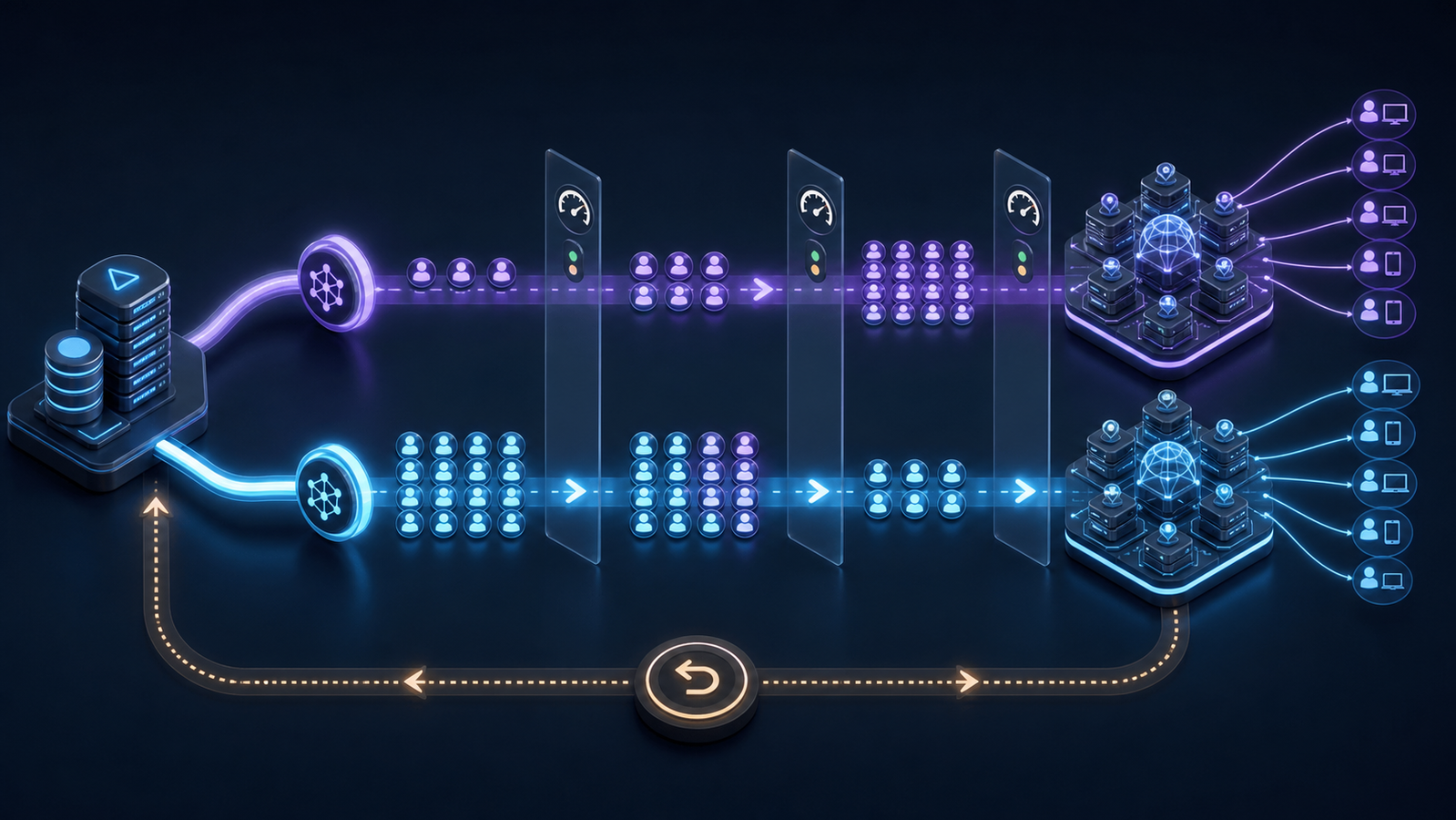
OTT CDN migration runbook: a staged cutover
The solution is a reversible traffic ramp, not a one-night flip. Keep the legacy and target CDNs serving the same playback contract throughout these stages.
1. Validate a non-production hostname
Attach the target CDN to a test hostname and use the production origin with controlled content. Run automated probes against master manifests, child playlists, MPDs, segments, subtitles, images, ads, keys, and licenses. Compare status, headers, content length or checksum where applicable, redirects, and timing with the legacy path.
Test real players, not only curl. Browser, mobile, connected-TV, and set-top-box stacks disagree on redirects, CORS, codecs, cookies, and TLS details.
2. Route employee and synthetic traffic
Send internal devices, device labs, and continuous playback probes to the target CDN through a header, dedicated hostname, or app configuration. Cover VOD start and seek, linear-channel joins, live-edge catch-up, ad breaks, audio and subtitle changes, background/foreground transitions, and token renewal.
This stage should run long enough to cross playlist refreshes, signed-token expiry, DRM renewal, and a complete live event window. A five-minute smoke test cannot expose a two-hour session failure.
3. Start a sticky production canary
Move a small cohort of real viewers, but assign at the session or viewer level. Do not randomly choose a CDN for every segment. Per-request splitting can make one player alternate between warm and cold caches, auth policies, and playlist timelines, creating a test that no final architecture will use.
Weight-based routing with session affinity is a documented deployment pattern; for example, CloudFront’s staging traffic controls can keep requests from one viewer on the same distribution. If your steering layer cannot provide affinity, use a stable hash of an account, device, or session identifier and retain an operational override.
4. Expand by controlled dimensions
Increase exposure one dimension at a time:
- Staff and synthetic viewers
- A low-risk market or device family
- A small global viewer cohort
- Selected VOD catalogs
- Live channels outside peak events
- Premium live events and the remaining library
This sequence is illustrative, not universal. Choose dimensions that isolate your risk. If connected TVs drive most viewing hours, do not leave them until the final jump; create an early, bounded TV cohort.
At each gate, compare target and control using the same content, time, and audience slice. Hold long enough to observe cache fill and complete sessions. A brief green window after a routing change may show only players that already buffered through the old CDN.
5. Ramp new sessions, then drain old ones
Prefer steering new playback sessions to the target while active sessions finish on their assigned path. This avoids switching a player between playlist timelines mid-session. HLS and DASH content steering can also expose multiple delivery pathways to compatible clients: Apple publishes an HLS Content Steering specification, and DASH-IF maintains DASH content-steering implementation guidance.
Client steering is useful when your supported players implement it consistently. It is not a reason to skip server-side routing, legacy-device testing, or an emergency default pathway.
6. Reach 100% without decommissioning
When all new sessions use the target CDN, keep the old configuration, certificates, origin access, signing keys, dashboards, and runbook intact. Watch residual traffic. Old app versions, cached DNS answers, bookmarked media URLs, downloads, and long sessions may continue to use the legacy path.
Treat “100% routed” and “safe to terminate” as separate milestones. Decommission only after residual requests are explained, the maximum meaningful session and token windows have passed, support signals are quiet, and rollback is no longer part of the agreed recovery plan.
Rollback without making the incident worse
A rollback should change as little as possible. Send new sessions back to the old CDN, preserve active-session affinity where feasible, and stop the ramp. Avoid purging both networks, rotating signing keys, changing origins, or editing manifests during the same response unless evidence demands it.
Use symptom-specific rollback triggers:
| Signal | Investigate first | Safe immediate action |
|---|---|---|
| Rising 403s | Token host/path, cookie forwarding, key group, clock skew | Return new sessions to the known authorization path |
| Manifest 200s but playback stalls | Stale playlist, dropped query parameters, rewritten segment paths | Revert affected format or channel cohort |
| Origin load spikes | Cold cache, cache-key fragmentation, shield bypass | Pause ramp; reduce target share before origin saturation |
| One device family fails | TLS, CORS, redirect, codec or player-specific behavior | Exclude that device cohort while others remain canaried |
| Ads fail but content plays | Personalized manifest caching, query/header forwarding | Roll back ad-supported inventory only |
Preserve logs and the failing cohort before changing configuration. If you erase the evidence, the next attempt will repeat the same blind spot.
When ZeroBuffer fits the target architecture
For teams moving a high-egress HLS workload, ZeroBuffer is a video streaming platform: it encodes, stores, and streams your catalogue over HLS with HTTP/3 and TLS 1.3. Its published pricing overview lists a 99.99% uptime SLA and a flat $0.0049/GB video-delivery rate across regions; test those capabilities against your actual markets, players, cache rules, and support requirements before committing the full audience.
The migration design stays the same regardless of destination: reproduce the playback contract, dual-run, canary sticky sessions, observe both QoE and origin health, and keep rollback live.
Common OTT CDN migration mistakes
Changing the player and CDN together
This creates overlapping failure domains. Keep player behavior stable first; upgrade it after delivery is proven, unless player-side steering is the migration mechanism itself.
Measuring edge latency but not playback
Fast manifest responses do not prove that segments, DRM, ads, or telemetry work. Viewer startup, rebuffering, bitrate, and fatal errors are the release metrics; CDN metrics explain them.
Using a single popular title as the test library
Popular content hides cold-cache and catalog-path problems. Include new releases, long-tail assets, multiple audio and subtitle layouts, each DRM scheme, live and VOD, and ad-supported playback.
Treating every query parameter as a cache key
Forwarding a parameter and varying the cache by it are different decisions. Excess cache-key dimensions fragment the cache; omitted functional parameters can return the wrong manifest. Classify every parameter explicitly.
Cancelling the old provider immediately
The old CDN is your fastest rollback until the new path survives real traffic and full session windows. Contract timing should follow technical drain, not force it.
Frequently asked questions
Can you switch an OTT CDN without changing the player?
Often, yes. If the player uses a branded media hostname and the new CDN preserves URLs, headers, authorization, CORS, and manifest behavior, traffic can move behind that hostname. Player changes may be required for client-side content steering, a new token scheme, changed DRM references, or provider-specific URLs embedded in manifests.
Does a CDN migration affect DRM?
It can, even when the DRM provider stays the same. Rewritten manifests, changed hostnames, CORS rules, license allowlists, signed requests, or content-ID mismatches can interrupt license acquisition or renewal. Keep the DRM workflow unchanged and test it separately across devices.
Should both CDNs run during migration?
Yes, for a business-critical OTT service. Parallel operation provides a control group, supports gradual traffic movement, and preserves a fast rollback path. Keep both available until residual legacy traffic and the longest relevant playback windows have cleared.
How long should an OTT CDN migration take?
There is no reliable universal duration. A simple VOD service with one format and no DRM is different from a global live service with SSAI, multiple DRMs, connected TVs, and long events. Set the schedule from the number of playback contracts and observation windows you must prove, not from the DNS change itself.
What should you monitor during the cutover?
Monitor startup failures, startup time, rebuffering, fatal player errors, bitrate, live latency, CDN error codes, cache hit ratio, edge timing, and origin load. Segment results by market, network, device, player, format, and content type so a local failure cannot disappear inside a global average.
Conclusion
An OTT CDN migration is complete when viewers cannot tell it happened and operators can prove why. Preserve the playback contract, establish a trustworthy control, validate manifests and segments separately, keep DRM and ads intact, move sticky cohorts through explicit gates, and drain the old path only after rollback is no longer needed.
If you are evaluating a new delivery layer, bring one live channel, a representative VOD catalog, your hardest device cohort, and your production authorization flow into the proof of concept. A provider that can pass that test—and help you rehearse the rollback—has earned the next traffic increment.
ZeroBuffer is built to take that test. It streams HLS to every browser, phone, and TV, with instant purge, HTTP/3 over QUIC and TLS 1.3, and multi-rendition encoding included at no extra charge — at a flat $0.0049/GB, no contracts and no minimums, so a single channel and one device cohort are enough to start. See how ZeroBuffer works or price the cutover.