




A 522 status code means visitors reached Cloudflare, but Cloudflare could not complete a timely exchange with your origin server. The page is down from the visitor's perspective, yet changing browser settings or repeatedly purging the CDN cache will not repair the failed origin path.
The fastest route to recovery is to preserve the evidence, test the origin without losing the production hostname, and then follow the failure to the firewall, DNS record, server, or network layer that owns it.
What Does a 522 Status Code Mean?
A 522 status code is a Cloudflare-specific “Connection timed out” response. It means Cloudflare either received no SYN+ACK from the origin within 19 seconds or established the TCP connection but received no acknowledgment of its HTTP request within 90 seconds.
Cloudflare documents both timeout paths in its official Error 522 reference. In practical terms, the request made it through DNS and reached a Cloudflare edge, but the edge-to-origin leg stalled before Cloudflare received an HTTP response.
The code is not a standard status defined by HTTP semantics. The IANA HTTP Status Code Registry lists 512–599 as unassigned, so software should treat 522 as a provider-specific 5xx response rather than a universal protocol definition.
Where the connection fails
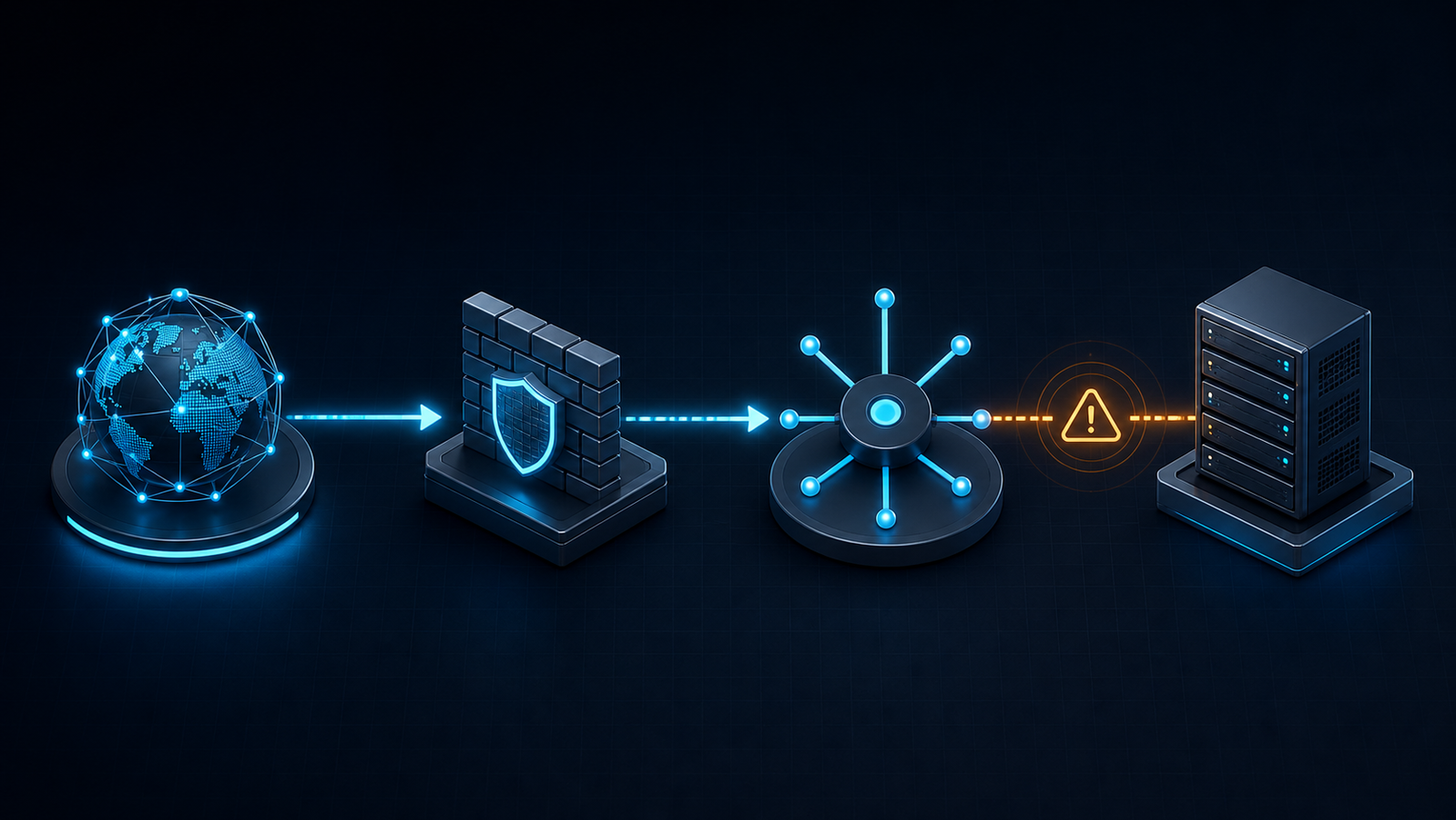
The request path looks like this:
- The visitor connects to Cloudflare.
- Cloudflare resolves the configured origin and sends a TCP SYN.
- The origin should answer with SYN+ACK, complete the handshake, and acknowledge the resource request.
- If the expected reply does not arrive inside Cloudflare's 522 windows, Cloudflare returns the error page to the visitor.
That sequence narrows ownership. The visitor-to-edge connection worked; the problem is usually at the origin, its firewall, or the route between Cloudflare and the origin. Cloudflare's 522 documentation identifies blocked or rate-limited Cloudflare addresses as the most common cause, followed by an overloaded or offline origin, disabled keepalives, a mismatched origin IP, or dropped packets.
522 Status Code vs. 520, 521, 502, and 524
Treating every Cloudflare 5xx as “the server is slow” sends the incident toward the wrong logs. Use the code to identify the failed phase first.
| Code | What Cloudflare observed | First place to look |
|---|---|---|
| 520 status code | The origin returned an empty, malformed, or unexpected response | Response headers, HTTP/2-to-origin settings, origin crashes |
| 521 | The origin refused Cloudflare's connection | Web server process, listening port, firewall rejection |
| 502 | A gateway received an invalid upstream response | Application, reverse proxy, load balancer, response integrity |
| 522 status code | The origin path did not complete a timely handshake or request acknowledgment | Firewall drops, origin reachability, capacity, routing |
| 524 status code | Cloudflare connected and the origin acknowledged the request, but the HTTP response took too long | Long-running application work and origin response time |
Cloudflare defines the 520 status code as an unknown or unexpected origin response. Put simply, a 520 Cloudflare error is about the response Cloudflare received, while a 524 Cloudflare error means the connection and request acknowledgment succeeded but the response exceeded the default 125-second proxy read timeout, as described in the current 524 status code documentation. For a denied request rather than an origin timeout, use the 403 Forbidden Cloudflare diagnostic guide.
How to Diagnose a 522 Status Code in Order
Random configuration changes destroy useful evidence. Capture one failing request, compare the proxied and direct-origin paths, and change only the layer the tests implicate.
1. Record the request before restarting anything
Save the affected URL, UTC timestamp, visitor region, recurrence pattern, response headers, and CF-RAY value. If only some URLs or regions fail, record that too. Cloudflare's troubleshooting-data guide explains that CF-RAY uniquely identifies the request through its network and is important for support investigations.
Start with a headers-only request:
curl -sS -D - -o /dev/null https://www.example.com/problem-path
Also check the Cloudflare status page. A broad provider incident changes the escalation path; a healthy status page does not prove your specific origin route is healthy.
2. Test the origin while preserving Host and TLS SNI
Do not browse to https://ORIGIN_IP and call that a valid origin test. Name-based virtual hosts and TLS certificates depend on the hostname, so an IP-only request can produce a different site or a certificate error.
Pin the hostname to the origin address with --resolve, so the Host header and TLS SNI still carry the public name while the packets go straight to the server:
curl -sv --resolve www.example.com:443:203.0.113.10 \
  https://www.example.com/problem-path -o /dev/null
Interpret the result:
- Direct origin also times out: the origin, its upstream network, or a host-level firewall is failing. Stay on the server path.
- Direct origin succeeds but the proxied request returns 522: inspect controls that treat Cloudflare traffic differently, especially allowlists, rate limits, security groups, and provider firewalls.
- Only certain paths fail: compare route-specific load, upstream dependencies, and Cloudflare Origin Analytics rather than assuming a total host outage.
Cloudflare likewise recommends temporarily pausing its proxy when you need to separate an origin issue from a Cloudflare-path issue, but a targeted --resolve test avoids changing live DNS behavior for every visitor.
3. Check whether the origin is actually accepting connections
Confirm that the load balancer or web server is listening on the expected public address and port. Check service health, connection backlog, CPU, memory, file descriptors, and concurrent connection limits. Correlate those signals with the captured timestamp instead of looking only at current averages after the spike has passed.
Inspect the firewall and web server logs together. If Cloudflare requests never appear in access logs and firewall events show silent drops, the request did not reach the HTTP layer. If the SYN arrives but the server cannot answer under load, capacity or backlog pressure is a stronger lead.
4. Validate DNS and every firewall boundary
Compare the proxied A and AAAA records in Cloudflare with the address your hosting provider currently assigns to the origin. A stale address after a migration, a forgotten AAAA record, or an Origin Rule that selects an unresolvable hostname can direct only part of the traffic to a dead path.
Then check every enforcement point: cloud security groups, network ACLs, host firewalls, iptables or nftables, hosting panels, fail2ban, load balancer policies, and upstream DDoS controls. Use Cloudflare's definitive IP range list as the source of truth; do not copy a static list from an old tutorial. Allow both the published IPv4 and IPv6 ranges on the ports your proxied records use, and remove conflicting rate limits that silently discard them.
Fix the 522 Status Code by Root Cause
Once the tests isolate the failed layer, make the smallest corrective change and repeat the same proxied request.
Cloudflare IPs are blocked or rate-limited
Update the relevant firewall, security group, or hosting-provider allowlist from Cloudflare's current ranges. Look for a broad deny rule evaluated before the allow rule and for automated bans that see many proxied connections from a small address set as abusive.
Do not disable the firewall wholesale. A temporary bypass may confirm the diagnosis, but the durable repair is an explicit, documented rule with monitoring for future range changes.
The origin IP or route is wrong
Correct stale A or AAAA records and audit Origin Rules, load balancer pools, and recent migration changes. Test each published address independently. If IPv4 works and IPv6 fails, either repair the IPv6 listener and route or remove the invalid AAAA record rather than leaving a partial outage.
The origin is overloaded or offline
Restore the web server or load balancer, then find why it stopped accepting work. Review connection queues, worker limits, autoscaling events, database saturation, deploy timing, and traffic volume. Adding capacity can restore service, but the incident is not closed until an alert can detect the same exhaustion before handshakes start timing out.
For cacheable media and static assets, reducing avoidable origin work directly reduces exposure to connection spikes. For video, ZeroBuffer removes that exposure by storing the library itself and streaming it from cache, so a cold segment never fans out into hundreds of fetches against your origin — which is exactly the pattern that pushes a media origin into 522 territory during a spike.
That will not fix an incorrect DNS record or a firewall blocking the active CDN, so repair those faults first. But if you are seeing recurring overload rather than a one-off misconfiguration, the origin is being asked to do work the edge should absorb.
Keepalives are disabled or connections are being dropped
Confirm that keepalives are enabled at the web server and every intermediary. Check idle timeouts across the CDN, load balancer, reverse proxy, and origin so one layer does not discard a connection another expects to reuse. Packet loss, asymmetric routing, or an upstream provider filter may require an MTR from the origin toward a Cloudflare address seen in the logs; Cloudflare specifically requests that evidence when ordinary checks do not resolve a 522.
Workers, Pages, or Origin Rules create a loop or dead target
Cloudflare's 522 documentation calls out several platform-specific cases: a Worker with a Custom Domain fetching its own hostname, a Pages CNAME pointed incorrectly, or an Origin Rule resolving to an unusable target. Inspect the final hostname and address after rules apply. Break self-fetch loops, point Pages to the custom Pages domain, and ensure the selected origin resolves to a reachable public endpoint.
Automate Detection Without Creating a Retry Storm
Monitor both sides of the proxy. Alert on 522 rate, origin TCP failures, handshake latency, connection saturation, and regional concentration; a single global uptime probe can miss a route-specific failure. Log CF-RAY at the origin so a user-visible error can be correlated with the request path.
Cloudflare's 2026 structured 5xx response update lets agents request JSON or Markdown for Cloudflare-generated errors 500, 502, 504, and 520–526. A 522 JSON response identifies the fault category as origin and includes Retry-After; clients should honor that value and use bounded backoff instead of multiplying origin load during an incident.
Test the representation safely against Cloudflare's diagnostic endpoint for your zone:
curl -sS --compressed \
  -H 'Accept: application/problem+json' \
  https://www.example.com/cdn-cgi/error/522
Persistent 522 responses also matter to search availability. Google's crawler status-code guidance says 5xx errors temporarily slow crawling; indexed URLs are initially preserved but can eventually be dropped when server errors persist.
Frequently Asked Questions
How do I fix error code 522?
Test the origin with the production hostname, verify the origin is online, confirm Cloudflare points to the correct A and AAAA records, and allow Cloudflare's current IP ranges through every firewall. If those checks pass, correlate server load and packet loss with the failed request's UTC timestamp and CF-RAY.
Is error code 522 temporary?
It can be temporary when a short traffic spike or route disruption clears, but it will persist when the origin is offline, DNS points to the wrong address, or a firewall keeps dropping Cloudflare traffic. Recovery depends on the underlying path responding inside the timeout windows.
Is a 522 error the visitor's fault?
Usually no. The visitor successfully reached Cloudflare, and the timeout occurred between Cloudflare and the configured origin. A visitor can retry later, but the site owner or hosting provider must repair the failing origin path.
What is the difference between a 522 and 524 status code?
A 522 means the origin did not complete a timely connection handshake or acknowledge Cloudflare's resource request. A 524 means Cloudflare connected and the origin acknowledged the request, but the HTTP response did not arrive before the proxy read timeout.
Can I bypass Cloudflare to test a 522?
Yes, but test without changing the hostname. Use curl --resolve to direct the production hostname to the origin IP so the request preserves the correct Host header and TLS SNI; temporarily pausing the proxy is a broader alternative.
Fix the failed layer, then stop the pattern
A 522 is an origin-path timeout, not a prompt to clear caches or change browsers. Preserve the timestamp and CF-RAY, run a hostname-correct origin test, then repair the first failed layer: DNS, firewall, capacity, keepalive, or routing. After recovery, turn that same evidence path into monitoring so the next timeout is detected before visitors report it.
If the timeouts keep coming back under load, the fix is architectural rather than diagnostic. ZeroBuffer pairs origin shielding with configurable cache policies and a 99.99% uptime SLA at a flat $0.0049/GB — free to start, no card — so you can measure how much origin traffic should never have reached you.