




Your product grid is fast for one visitor and slow for the next. Chrome receives AVIF, an older client gets a broken image, editors replace a product photo but some regions keep the old one, and a harmless URL change destroys the cache-hit ratio. A picture CDN can solve the delivery problem, but only when its request path and cache rules are designed deliberately.
This guide stays focused on that delivery path: how one source becomes a cached derivative, how a browser gets a compatible format, and how to keep variants fresh without turning every request into an origin fetch. If you need a feature-by-feature buying framework, use our separate image optimization services evaluation guide.
The cache-key and variant discipline below is what makes any picture CDN work, and getting it wrong is the difference between a 95% hit ratio and an origin that re-encodes the same hero image a thousand times a day.
What is a picture CDN?
A picture CDN is an edge delivery system that retrieves a source image, creates or selects a requested derivative, and caches that result near users. It can vary the response by dimensions, crop, quality, and browser-supported format so each request receives useful pixels without repeatedly processing the original.
The phrase describes the picture-specific path rather than a fundamentally different kind of network. A conventional CDN can cache an unchanged JPEG or PNG. A picture-aware layer adds a transformation service and rules for choosing among outputs, then relies on the CDN to distribute those outputs.
That distinction matters operationally. The first request for a 640-pixel WebP may need to travel from an edge point of presence to a processor and then to object storage. The next matching request can be answered by the cached derivative. ImageKit's description of the request flow follows this same pattern: edge lookup, processing or source retrieval on a miss, then caching for later requests.
Think of the system as three connected layers:
- Source: the original asset in object storage, a media library, or a web origin.
- Transformation: a controlled recipe that produces a width, crop, quality, and output format.
- Delivery: an edge cache that reuses the exact derivative for equivalent requests.
If any layer is ambiguous, the apparent speed advantage disappears. A slow or distant source lengthens cold requests. Unbounded recipes create a long tail of one-use derivatives. A bad cache key serves the wrong format or misses when two requests should have matched.
How a picture CDN handles one image request
The easiest way to understand picture delivery is to trace a single URL. Suppose a page requests:
https://media.example.com/products/shoe.jpg?w=640&fit=cover&quality=75&format=auto&v=8
The browser first resolves the media hostname and connects to the edge. The CDN normalizes the request according to its configuration and calculates a cache key. At minimum, HTTP caches use the request method and target URI; negotiated responses may also depend on request headers named by Vary, as defined by the HTTP caching standard, RFC 9111.
On a cache hit
When the edge already has a fresh object for that key, it returns the derivative immediately. The source store and transformation service do no work. This is the path that should handle most requests for popular variants.
A hit is not merely “the file exists somewhere in the CDN.” It means the stored response matches the relevant URL parameters and request headers, remains fresh under the current policy, and is valid for reuse. Response headers such as Age, a provider-specific cache status, Content-Type, Cache-Control, ETag, and Vary help explain why that decision occurred.
On a cache miss
When no usable derivative exists, the edge forwards the request to the image-processing path. The processor fetches the master asset, validates the requested operations, generates the output, and sends it back through the CDN. The edge stores the response if policy permits, then returns it to the browser.
This cold path has more latency components: edge-to-processor travel, source lookup, source transfer, decoding, resizing or cropping, encoding, and the return trip. Cloudflare's current image transformation overview documents the same miss behavior: fetch the source, apply parameters, cache the transformed result, and serve it.
On a stale match
A stale object does not always require downloading the source again. With a validator such as ETag or Last-Modified, the cache can issue a conditional request. An unchanged asset can produce a small 304 Not Modified response, allowing the stored body to be reused; a changed asset returns a new representation.
MDN's HTTP caching guide explains this revalidation pattern and the role of Cache-Control, validators, and 304 responses. The practical goal is to separate “check whether it changed” from “transfer and transform the whole source again.”
Design the cache key before optimizing pixels
An image derivative is a function of inputs. If width, height, crop, quality, source version, or output format can change the bytes, those inputs must be represented in the cache key or normalized into a preset that is.
For URL-driven transformations, treat these as distinct objects:
/shoe.jpg?w=320&fit=cover&v=8
/shoe.jpg?w=640&fit=cover&v=8
/shoe.jpg?w=640&fit=contain&v=8
But semantically identical requests should not create separate objects. If parameter order does not matter, normalize it. Strip analytics parameters from media URLs. Map aliases to one canonical value, reject unsupported dimensions, and avoid defaults that can be expressed in multiple ways.
Prevent variant explosion
An endpoint that accepts any integer width exposes thousands of possible derivatives for one source. Crawlers, frontend rounding, query-string noise, or abuse can fill the cache with objects that are requested once. The result is lower cache reuse, repeated encoding, higher storage or operation counts, and more source traffic.
Prefer a width allowlist based on actual layout slots—for example 320, 480, 640, 960, 1280, and 1600 pixels. Use named transformation presets when crops or quality policies belong to components. Sign URLs or otherwise restrict public transformations when a user can modify expensive parameters.
Versioning belongs in the key too. A stable source path plus v=8 lets you keep a long cache lifetime and switch to v=9 when the master changes. The old object can age out naturally while new requests become immediately distinguishable. This is often more predictable than trying to purge every width, crop, and format under pressure.
Negotiate formats without poisoning the cache
Automatic format selection sounds simple: inspect what the browser accepts, return AVIF or WebP when supported, and fall back to JPEG or PNG. The cache must still know that those responses differ.
The standard mechanism is the request's Accept header plus a response such as:
Content-Type: image/avif
Vary: Accept
Cache-Control: public, max-age=86400
Vary: Accept tells conforming caches that the selected response depends on the browser's declared media preferences. Cloudflare's 2026 Vary for Images documentation describes separate caching of modern and legacy variants based on Accept, so later browsers with equivalent preferences can reuse the correct object.
The alternative is to make the format explicit in the URL, such as format=avif or a file extension. That simplifies the key, but the application or an upstream service must choose a supported format. Both models work; mixing them without a clear owner creates surprises.
Check four things in production:
- the response
Content-Typematches the actual bytes; - unsupported clients receive a tested fallback;
- cache-status headers show reuse for repeated equivalent requests;
- one client's response cannot be replayed to an incompatible client.
Avoid varying on the entire User-Agent string. MDN warns in its caching guidance that the enormous number of user-agent variations reduces the chance of reuse. A small capability signal such as Accept, or explicit format URLs generated through <picture>, produces a more tractable cache surface.
Control picture freshness with TTLs, validators, and versions
Image freshness is a business rule, not one universal number. A fingerprinted application asset can be cached for a year because a content change creates a new URL. A product image stored at a mutable path needs a shorter policy, revalidation, purge support, or an application-controlled version token.
Use these controls for different jobs:
| Control | Best use | Main trade-off |
|---|---|---|
| Long TTL + fingerprinted URL | Immutable assets and release bundles | Requires URLs to change with content |
| Version query or path | Catalog and CMS assets with controlled updates | Application must increment the version |
| Validator revalidation | Stable URLs where changes are occasional | Stale checks still reach upstream layers |
| Purge by tag or source | Urgent corrections across many variants | Purge scope and propagation must be tested |
| Short TTL | Highly changeable or hard-to-version images | More revalidation and cold-path work |
Do not assume replacing the source invalidates every derivative automatically. Document which event changes the key, which cache layers receive a purge, whether generated variants have their own storage, and how long propagation takes.
Netlify's Image CDN documentation provides a useful concrete model: each transformation is uniquely cached, and a new atomic deploy causes transformations to be rerun for changed sources. Your platform may use a version token, metadata validator, or explicit purge instead; what matters is that source identity and derivative identity move together.
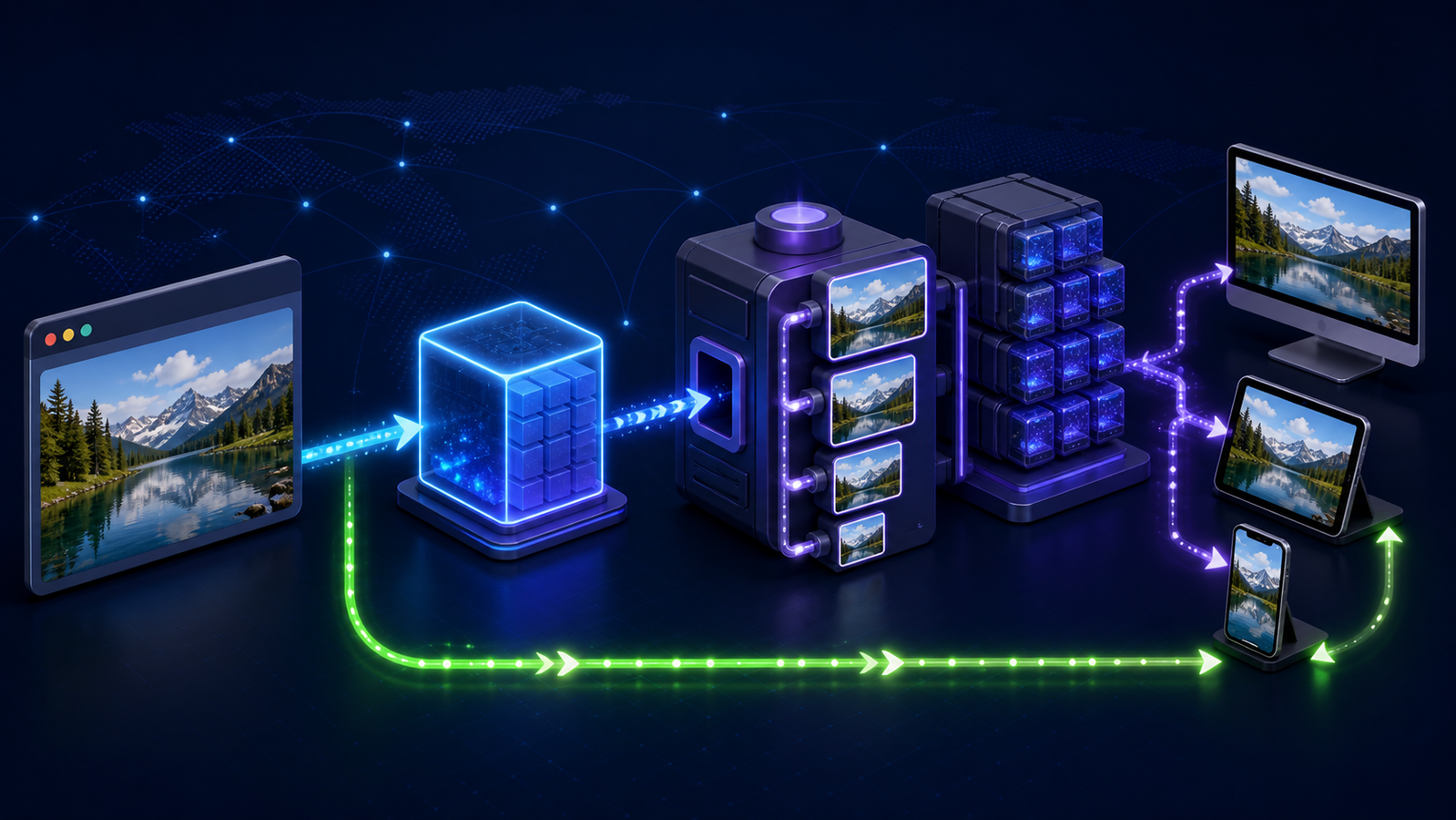
Build a reliable picture CDN delivery path
Start with a small, observable path rather than rewriting every image URL at once.
1. Keep one trustworthy master
Store an original that has not been repeatedly recompressed. Give it a durable asset ID and capture content type, dimensions, and a revision or content hash. Decide whether the transformation service pulls it through a public URL, an authenticated origin, or an integrated object store.
Remote-source rules are a security boundary. Allowlist hostnames, constrain redirects, limit source dimensions and bytes, and decide how private assets are authorized. Netlify's documentation, for example, requires configured patterns for remote images and does not forward credential-bearing request headers to a remote source.
2. Define a bounded derivative policy
Inventory real layout slots and create a short width ladder. Specify crop modes, quality by content class, animation behavior, metadata retention, maximum output size, and fallback format. Centralize those choices in a URL builder or named presets so separate teams do not invent incompatible variants.
3. Make browser selection explicit
Use srcset and sizes when the browser should choose a width. Use <picture> when you need explicit source order, art direction, or format fallbacks. Give images intrinsic width and height, lazy-load below-the-fold assets, and keep the likely Largest Contentful Paint image eager and discoverable.
Google's responsive image guidance notes that serving desktop-sized images to mobile devices can use two to four times more data than needed. It also connects responsive delivery to shorter LCP resource duration when the LCP element is an image. A fast edge cannot recover bytes wasted by inaccurate sizes markup.
4. Set headers as part of the API
Define Cache-Control, validators, Content-Type, and Vary deliberately. Decide whether format is a URL input or negotiated header. Preserve a correlation or request ID through the edge and processor when possible, and expose a cache-status signal that operations teams can inspect.
When a provider derives variants at the edge rather than at a separate transformation service, the derivative and the cached object are the same thing — there is no second hop to invalidate, and a purge can clear the source and every variant together.
That matters for the cache-key discipline described above. When transformation lives outside the CDN, teams end up maintaining two freshness models that drift: a TTL on the transformed asset and a different one on the original. Collapsing them into one path removes an entire class of "the image updated but some regions kept the old crop" incidents.
5. Warm only what earns it
Prewarming every theoretical derivative recreates the storage and processing problem the on-demand design was meant to avoid. Warm a small set of high-traffic hero or campaign variants before a launch, then let normal demand fill the long tail. Measure whether warmup traffic creates reusable objects at the same cache tier users reach.
Picture CDN performance and correctness checklist
Test the system as a request pipeline, not as a single Lighthouse score.
- Request a known derivative twice from the same region; the second response should show an edge hit.
- Repeat with parameters in a different order; either normalization should produce the same key or invalid ordering should be rejected consistently.
- Request allowed widths and one disallowed width; the latter should fail cheaply without encoding.
- Send
Acceptvalues representing modern and legacy clients; verify bothContent-Typeand cache separation. - Replace the source, increment its version or purge it, and verify every relevant width and format converges on the new content.
- Let a derivative become stale; confirm whether it revalidates, regenerates, or serves stale content under a documented rule.
- Test a missing source, corrupt file, oversized source, processor timeout, and origin outage.
- Compare cold and warm time to first byte from priority user regions.
- Inspect delivered width against rendered width and device pixel ratio on core templates.
- Track cache-hit ratio, transformations, origin requests, source bytes, delivered bytes, errors, and cost by preset.
Segment hit ratio by derivative class. One global number can hide a popular 640-pixel product preset performing well while arbitrary avatar widths churn constantly. Also separate edge hits from hits in a central transformed-image store; both avoid encoding, but only one avoids the longer network path.
Common picture delivery failures
The wrong format appears intermittently
The response varies by browser capability, but the key does not. Inspect Vary, Accept, explicit format parameters, and any provider-specific cache-key configuration. Purge the contaminated objects after fixing the rule.
Updated pictures remain stale in some regions
The source changed without changing derivative identity, or purge propagation missed a cache layer. Add versioned URLs for planned changes and test purge-by-source behavior for emergencies.
Cache-hit ratio drops after a frontend release
New component widths, reordered parameters, duplicate defaults, or tracking query strings created fresh keys. Compare top cache keys before and after the release, then normalize URLs and enforce presets.
The first visitor still waits too long
The cold path may cross distant processing and storage regions or perform expensive transforms. Move the processor closer to the source, use origin shielding or request collapsing, pre-generate a small set of critical variants, and serve a stale derivative during safe upstream failures when supported.
LCP does not improve despite smaller files
The browser may discover the hero late, lazy-load it, or choose an oversized candidate because sizes is inaccurate. Inspect the HTML and network waterfall; CDN latency and byte size are only parts of the LCP path.
Frequently asked questions
What is a CDN for images?
It is a content delivery path that caches pictures at distributed edge locations so users can download them from a nearby server. A picture-aware implementation can also generate and cache resized, cropped, compressed, or format-specific derivatives.
How do you use a CDN for pictures?
Connect the CDN to a source store, define allowed transformations and cache rules, then generate media URLs through a shared helper. Add correct responsive markup, test negotiated formats and invalidation, and monitor warm versus cold delivery before expanding traffic.
Is there a free CDN for pictures?
Some services offer free allowances, but the meaningful limit may be bandwidth, requests, transformations, storage, or features. Evaluate the full request path and expected variant count; a free tier can still be a poor production fit if it lacks cache controls, custom domains, or predictable overage pricing.
Does a picture CDN replace srcset and <picture>?
No. The CDN creates and delivers variants, while HTML tells the browser which candidates exist and how an image will be displayed. You still need accurate srcset and sizes, or <picture> for explicit format and art-direction choices.
Should picture URLs be versioned?
Version them when source content can change while the logical asset stays the same. A revision or content hash makes the new derivative a new cache object, which supports long TTLs and avoids relying on a broad purge for routine updates.
Conclusion: make picture delivery predictable
A picture CDN works well when an engineer can explain exactly why a request hit or missed, which inputs selected the derivative, how the browser received a compatible format, and what makes that object fresh. Edge count and compression ratios are secondary if the key is fragmented, the fallback is unsafe, or a source update cannot reach every variant.
Start with one high-traffic image class. Bound its transformations, version its source, implement one format strategy, and run the correctness checklist across warm, cold, stale, and failure paths. Expand only after cache reuse, LCP behavior, origin load, and delivery cost are visible in production.